

CozyBar icon
CozyBar icon

CozyBar

 1 like

A Windows-inspired taskbar for macOS with live window previews, a Windows-style task manager, multi-monitor support, and an option to preserve window order when minimizing apps. It runs locally, works offline, and requires Accessibility and Screen Recording permissions.
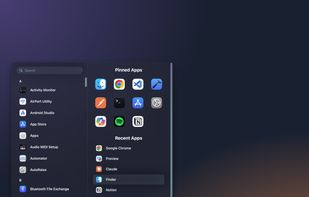
Start menu

Cost / License

  • Freemium (Pay once)
  • Proprietary

Application type

Since

  • New

Platforms

  • Mac  The app will request Accessibility and Screen Recording permissions. We have created a setup wizard that runs upon first installing the app which will explain the permissions it needs and why.
1like
0articles
Save

Features

Properties

Features

Highlights All activities

CozyBar News & Activities

Recent activities

CozyBar information

  • Developed by

    GB flagNaumachia Design
  • Licensing

    Proprietary and Freemium product.
  • Pricing

    One time purchase (perpetual license) that costs $13 + free version with limited functionality.
  • Alternatives

    10 alternatives listed
  • Badge

    Get an embeddable badge for CozyBar
  • Supported Languages

    • English

AlternativeTo Categories

OS & Utilities, Office & Productivity

Popular alternatives

View all
CozyBar was added to AlternativeTo by naumachiadesign on and this page was last updated .

No comments or reviews, maybe you want to be first?

What is CozyBar?

CozyBar brings a Windows-style taskbar to macOS. If you find the Dock limiting, or you're coming from Windows and miss the old UX, CozyBar gives you a familiar, natural way to see and switch between everything you have open.

Window previews: click any app on the taskbar to see live previews of all its windows. Rename windows to keep them organized (for example, "Work" and "Play" for two browser windows full of tabs), drag them into the order you want, and open or close windows right from the previews.

Built-in Task Manager: right-click the taskbar for live CPU, memory, disk and network charts. Click a chart to see its history and the apps using the most, and end any process in a couple of clicks.

Start menu: all your apps in one place, plus your pinned apps, recently used apps and Finder favorites, with a search bar to help you find things quickly.

Windows stay where you put them: on macOS, minimizing a window can pull the app's other windows in front of your work. CozyBar keeps the rest exactly where you left them, just like Windows. You can switch this off if you prefer the macOS behavior.

Private by design: no account, no analytics, no telemetry. CozyBar only goes online to check for updates and validate your license. Like other taskbar apps, it needs macOS Accessibility permission to arrange your windows and, optionally, Screen Recording permission to show live window previews (despite its name your screen is never recorded or sent anywhere).

Try it free for 14 days, no credit card or email needed, then it's a one-time $12.99. You can also try a live demo in your browser at cozybar.app without downloading anything. Requires macOS 14 Sonoma or later.

CozyBar Videos