
Docktopus icon
Docktopus icon

Docktopus

Replaces the standard macOS dock with customizable layouts, app and folder pinning, window previews, keyboard switching, clipboard search, an expandable top panel, per-app audio mixing, system stats, activity history, and local screenshot-based recall.
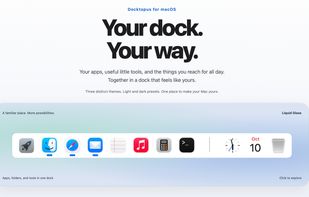
Overview

Cost / License

  • Pay once
  • Proprietary

Application type

Platforms

  • Mac
0likes
0articles
Save

Features

Properties

Features

Highlights All activities

Docktopus News & Activities

Recent activities

Docktopus information

Docktopus was added to AlternativeTo by Ronny Stiftel on and this page was last updated .

No comments or reviews, maybe you want to be first?

What is Docktopus?

Docktopus is a customizable dock that incorporates various desktop tools into one place. Unlike the standard macOS Dock, Docktopus allows you to add window previews, clipboard history, audio controls, system stats, and more alongside your app icons. You can customize the layout and widgets to suit your needs.

Key features include:

  • Dock and window switching: Preview windows of running apps and switch between them using your keyboard. Import your existing macOS Dock, pin apps and folders, and choose its display location.
  • Dynamic Island: An expandable panel for music controls, clipboard history, system stats, calendar events, notifications, and audio/display controls. It includes a Drop Zone for temporarily storing files.
  • Clipboard manager: Search copied text, links, images, and files; pin frequently used items and categorize them.
  • Time Spent: Track app usage, daily trends, and browser titles/URLs. Add manual entries, run timers, and export records as CSV.
  • Remembrance: Save screenshots of active windows and recognize their text. Search past work by text, app, or date.
  • Audio Mixer: Adjust or mute individual apps, switch audio outputs, and manage system volume.
  • Other features: CPU/GPU, memory, and network stats; brightness controls; calendar, timers, Now Playing, a color picker, and Coffee to keep your Mac awake.

Customize the look with themes like Liquid Glass, CDE, and Windows 95, and editable colors, fonts, and icons.

For privacy, Clipboard history, Time Spent, and Remembrance data stay local. A Privacy Pause feature temporarily stops these from collecting new activity.

A trial is available before purchase. The launch price is $19.99 ($29.99 regular) for two Macs, including a year of updates. No subscription is required after the covered versions.

