

Cover for Mac icon
Cover for Mac icon

Cover for Mac

 Like

Lock Mac apps, websites, and private files behind Touch ID, Apple Watch, or your Mac password. Native Liquid Glass UI, 100% local, one-time purchase.
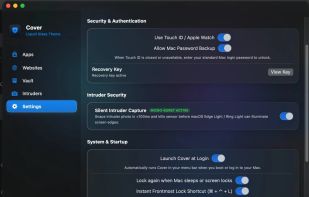
Cover for Mac screenshot 1

Cost / License

  • Pay once
  • Proprietary

Since

  • New

Platforms

  • Mac
0likes
0articles
Save

Features

Properties

Features

Highlights All activities

Cover for Mac News & Activities

Recent activities

Cover for Mac information

AlternativeTo Category

File Management
Cover for Mac was added to AlternativeTo by Paul on and this page was last updated .

No comments or reviews, maybe you want to be first?

What is Cover for Mac?

Lock your Mac apps, websites, and private files behind Touch ID, Apple Watch, or your Mac password. Built natively for macOS with zero subscriptions and 100% local privacy.

Key Features

• Biometric App Lock — Lock any app behind Touch ID, Apple Watch, or your Mac password, with optional schedules. • Fake Crash Disguise — Make locked apps look like they crashed (hold Option + click Reopen to unlock). • Extension-Free Website Lock — Lock specific websites across Safari, Chrome, Brave, Firefox, and Edge without browser extensions. • AES-256 Encrypted Vault — Encrypt and hide private files and folders locally. • Silent Intruder Capture — Automatically snaps a webcam photo on failed unlock attempts. • Native Liquid Glass UI — Includes 6 themes: Liquid Glass, Midnight, Clean White, Sakura, Bubble, and Night Drive. • 100% Offline & Private — No accounts, no cloud sync, no tracking.

Compatibility & Setup

• Requires Apple Silicon Mac (M1/M2/M3/M4) running macOS 13 (Ventura) or later. • First launch: Right-click Cover.app → Open (or System Settings → Privacy & Security → Open Anyway), then enter your Gumroad license key.