

Copy & Save icon
Copy & Save icon

Copy & Save

 1 like

Copy & Save is a Chrome extension that saves everything you copy and files it into folders on its own.
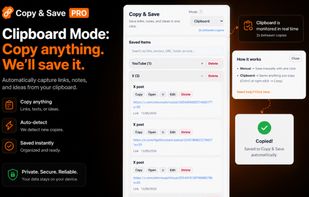
Copy & Save screenshot 1

Cost / License

  • Freemium (Subscription)
  • Proprietary

Application type

Since

  • New

Platforms

  • Microsoft Edge
  • Google Chrome
1like
0articles
Save

Features

Features

Highlights All activities

Copy & Save News & Activities

Recent activities

Copy & Save information

  • Developed by

    Aptenly
  • Licensing

    Proprietary and Freemium product.
  • Pricing

    Subscription that costs $5 per month + free version with limited functionality.
  • Alternatives

    5 alternatives listed
  • Badge

    Get an embeddable badge for Copy & Save
  • Supported Languages

    • English

AlternativeTo Category

Office & Productivity

Popular alternatives

View all
Copy & Save was added to AlternativeTo by copysave on and this page was last updated .

No comments or reviews, maybe you want to be first?

What is Copy & Save?

Copy & Save is a Chrome extension that saves everything you copy and files it into folders on its own.

Most clipboard managers give you one flat list to scroll through. Copy & Save sorts as you go: YouTube links in one folder, X links in another, shopping links in a Buy Later folder, and any folder you create yourself. There is no shortcut to remember and nothing to organize afterwards.

It also catches “Copy link” from the share menus on YouTube, X, Reddit, Twitch and Kick, which most clipboard extensions miss entirely.

A manual mode is available for people who prefer to choose what gets saved. Clipboard history is searchable and always one click away. Items are stored locally in the browser — nothing is sold and nothing is shared.

Built for links, text and notes. Long code blocks are deliberately ignored, so it won’t fill up while you’re programming.

Free to use, with an optional Pro plan.