
Copixy icon
Copixy icon

Copixy

 Like

Copixy is a free and open-source screenshot tool for Windows 10 and 11. It lives in the system tray and starts with a hotkey (PrtSc by default) or a click on the tray icon. Select an area, mark it up and copy or save it in seconds.
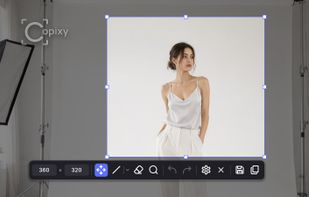
Main view

Cost / License

  • Free
  • Open Source (MIT)

Since

  • New

Platforms

  • Windows
0likes
0articles
Save

Features

Properties

Features

Highlights All activities

Copixy News & Activities

Recent activities

Copixy information

AlternativeTo Category

Photos & Graphics

GitHub repository

  •  0 Stars
  •  0 Forks
  •  0 Open Issues
  •   Updated  
View on GitHub
Copixy was added to AlternativeTo by Alexey Chistov on and this page was last updated .

No comments or reviews, maybe you want to be first?

Official Links

What is Copixy?

Copixy is a free and open-source screenshot tool for Windows 10 and 11. It lives in the system tray and starts with a hotkey (PrtSc by default) or a click on the tray icon. Select an area, mark it up and copy or save it in seconds.

Copixy is a single portable .exe of about 700 KB. It needs no installation, works offline and has no ads or telemetry.

Precise selection

  • Resize the frame with corner and side handles, move it by dragging or with the arrow keys
  • Type the exact width and height in pixels
  • Shift keeps the frame square, Alt resizes it from the center
  • Built-in magnifier with crosshair and pixel coordinates (hold Z)

Annotations

  • Lines and arrows, pencil, rectangles and ellipses, with optional dashed outlines
  • Text with adjustable size and weight; you can move and edit it after placing
  • Cursor and pointing-hand stamps to show where to click
  • Colors, line thickness, opacity and blend modes (Multiply, Screen, Overlay and more), which also make a good highlighter
  • Eraser that restores the original screenshot, and unlimited undo/redo

Saving and sharing

  • Copy to the clipboard with Ctrl+C or Enter
  • Save as PNG or JPG with adjustable quality
  • Automatic file names with date, time and numbering

Convenient

  • The toolbar stays attached to the frame and moves aside near screen edges
  • Normal and compact toolbar sizes; sharp on high-DPI and multi-monitor setups
  • Optional autostart with Windows and an optional update check via GitHub

Source code (MIT license): https://github.com/Deformarium/Copixy