Cool Find Alternatives

Cool Find is described as 'Is powerful file search & desktop search software for Windows XP, developed by Nihuo Software' and is a File Search utility in the file management category. There are more than 25 alternatives to Cool Find for a variety of platforms, including Windows, Linux, Mac, Microsoft Outlook and File Explorer apps. The best Cool Find alternative is Everything, which is free. Other great apps like Cool Find are FSearch, DocFetcher, GCstar and Agent Ransack.

Copy a direct link to this comment to your clipboard
Cool Find alternatives page was last updated

Alternatives list

  1. CSearcher icon
     5 likes
    Copy a direct link to this comment to your clipboard

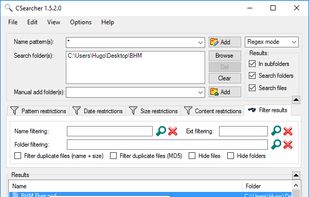
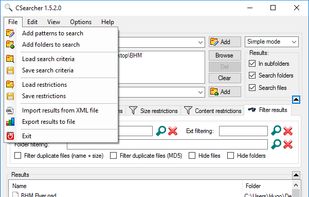
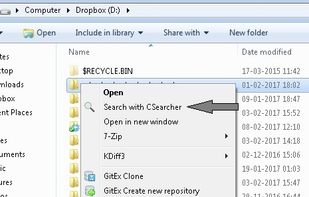
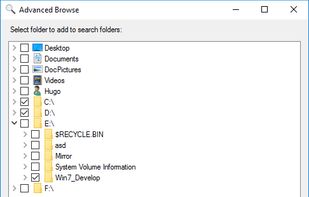
    CSearcher is a simple and fast free non-indexing search program.

    Searching computer files and folders is rather common for every PC user daily. Using standard Windows Explorer solution for this has many disavantages: it's slow, uses lots of RAM and many times it does not fin.

    Cost / License

    • Free
    • Proprietary

    Application type

    Alerts

    • Discontinued

    Platforms

    • Windows
     
  2. BareGrep icon
     13 likes
    Copy a direct link to this comment to your clipboard

    A free file finding and text searching tool:

    • Regular expression text search
    • High performance search algorithm
    • Wildcard and regular expression file search
    • Recursive directory search
    • Save, name and manage text search patterns
    • Interactive, incremental search
    • Ext.
    72 BareGrep alternatives

    Cost / License

    • Freemium
    • Proprietary

    Application type

    Platforms

    • Windows
     
  3. Copy a direct link to this comment to your clipboard

    Find in Files is a free web tool that can quickly find a desired information in a dozen of files right in a browser. It can search a text in PDF files by phrases or regular expressions.

    112 Find in Files (quick search text) alternatives

    Cost / License

    • Free
    • Proprietary

    Application type

    Platforms

    • Online
     
    • Find in Files (quick search text) is the most popular Web-based alternative to Cool Find.

    • Find in Files (quick search text) is Free and ProprietaryCool Find is Paid and Proprietary
  4. Copy a direct link to this comment to your clipboard

    Advanced Recent Access is designed to see more properties of your recent used resources (files and directories). Key features: can see more properties of the recent resources, such as path, size, type, date modified and date created. And more.

    263 Advanced Recent Access alternatives

    Cost / License

    • Subscription
    • Proprietary

    Application type

    Platforms

    • Windows
     
  5. Copy a direct link to this comment to your clipboard

    SMF is a file and file duplicate search tool that uses hashing (MD5, CRC32 or SHA1) to determine similarity. It has tons of search filter capabilities and a result reporting tool, with which you can sub-filter the result set according to your needs.

    Cost / License

    • Free
    • Open Source

    Application type

    Platforms

    • Windows
     
  6. Copy a direct link to this comment to your clipboard

    Outlook and desktop search to help you search and find information from your files, emails and documents on your computer. Now also with a secure p2p network so you can share information and collaborate with your friends and colleagues.

    Cost / License

    • Free
    • Proprietary

    Application type

    Platforms

    • Windows
    • Microsoft Office Outlook
     
  7. Copy a direct link to this comment to your clipboard

    Effective File Search (EFS) is a powerful but easy to use search tool. Search any files on your computer or local network with this effective software. EFS is a real replacement for the Windows Search utility. You can save a lot of time with this excellent file search tool.

    Cost / License

    • Free
    • Proprietary

    Application type

    Platforms

    • Windows
     
  8. Beagle icon
     3 likes
    Copy a direct link to this comment to your clipboard

    Beagle is a search tool that ransacks your personal information space to find whatever youre looking for.

    Cost / License

    • Free
    • Open Source

    Application type

    Alerts

    • Discontinued

    Platforms

    • Linux
     
  9. Copy a direct link to this comment to your clipboard

    "InSight Desktop Search" is a search engine that keeps track of all the files in your system and makes sure that you can access your files/folders easily and quickly. It is more than just a search engine, it’s also a music jukebox,that features ability to search for...

    Cost / License

    • Free
    • Proprietary

    Platforms

    • Windows
     
  10. Copy a direct link to this comment to your clipboard

    Ultra File Search is a portable non-indexing Search Utility which is able to find quickly Files, Folders and Text on your Local, Network, DVD, CD-ROM, USB Hard or Flash Drives.

    Cost / License

    • Pay once
    • Proprietary

    Application type

    Platforms

    • Windows
     
  11. FileSearchEX icon
     5 likes
    Copy a direct link to this comment to your clipboard

    FileSearchEX is the no nonsense file search utility for Windows 7 and higher. It offers the simplified search interface like Windows XP yet in an updated and modern fashion. Unlike other search tools, FileSearchEX works well with limited account permissions.

    Cost / License

    • Pay once
    • Proprietary

    Application type

    Platforms

    • Windows
     
You are at page 3 of Cool Find alternatives