




Coluracetam
Like
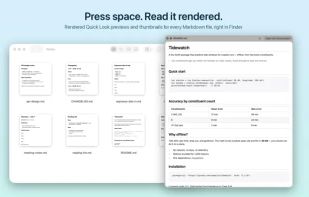
Native macOS tool delivering live-rendered, GitHub-style Markdown previews in Finder and app, including Quick Look, thumbnails, split source/preview editor, code highlighting, zoom, find, and export. Requires macOS 26, open source, also on Mac App Store.

Cost / License
- Free
- Open Source (MIT)
Platforms
- Mac


Features
Coluracetam News & Activities
Highlights All activities
Recent activities
- Mauricio B. Holguin updated Coluracetam
- kageroumado added Coluracetam
- Mauricio B. Holguin updated Coluracetam
 kageroumado added Coluracetam as alternative to Caret Markdown Editor, Typora, ghostwriter and MarkText

Coluracetam information
Developed by
KageroumadoLicensing
Open Source (MIT) and Free product.Written in
Alternatives
4 alternatives listedBadge
Get an embeddable badge for ColuracetamSupported Languages


No comments or reviews, maybe you want to be first?