
Cmdr
Like
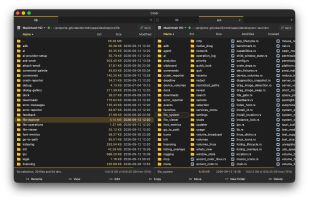
A blazing-fast, keyboard-driven two-pane file manager for macOS. The modern successor to Total Commander and mc, with fully optional, privacy-first AI features.
Cost / License
- Free Personal
- Open Source
Platforms
- Mac


Cmdr
Like
Features
Properties
- Lightweight
- Privacy focused
Features
- Works Offline
- Ad-free
- No registration required
- Built-in viewer
- Portable
- Live Preview
- Dark Mode
- Dual Pane Support
- Rust
Cmdr News & Activities
Highlights All activities
Recent activities
tobiash added Cmdr as alternative to TheCommander and Nimble Commander- tobiash updated Cmdr
- tobiash added Cmdr
Cmdr information
No comments or reviews, maybe you want to be first?
What is Cmdr?
Cmdr is an extremely fast, keyboard-driven two-pane file manager for macOS, written in Rust. Built for people who miss Total Commander since switching to a Mac.
Cmdr is in open beta! It means there might be sharp edges, but for its core, it's already stable software used every day by a small group of enthusiastic testers. You're welcome to be one of them! Feedback goes straight to the developer.
Cmdr is free forever for personal use with its source code available, but a commercial license is needed for work use.
Basic features:
- Full, keyboard-first list/copy/move/rename/delete capabilities
- All the familiar shortcuts (F5, F6, F8, etc.), but fully customizable
- Accurate progress bars, ETAs, cancellation, and even rollback
- Honest and transparent UI and UX, with even the full source code available (at https://github.com/vdavid/cmdr), no bs, no opaque error messages.
- Optimized for speed: lists 50k files near-instantly, the built-in viewer opens 10+ GB files also near-instantly with fast search.
Distinguishing features:
- Shows live sizes for all your folders (!)
- Network drives (SMB) use custom code for ~4x faster access than macOS.
- Can read/write Android phones, Kindles, cameras over MTP/PTP, at up to 4x speed compared to Android File Transfer and the like.
- Browse git history, branches, worktrees, stash like normal folders
AI:
- AI is controversial these days, so it is FULLY OPTIONAL to enable it in the product. Without it, you still have a really nice Total Commander-like experience.
- With AI enabled, you also have natural-language search ("that presentation about turtles from last week"), smart selection. Smart renaming and auto-organization are on the way.
- AI is on-device, privacy-first, so your files and data never leave your Mac. But if you want a smarter model, you can bring your own OpenAI/Claude/Gemini/etc. key to use any cloud model, or plug in any OpenAI-compatible API and bring your own LLM.
- Cmdr does not charge for AI features. You either use the built-in model for free, or pay your own API bills (Cmdr uses well under $1/month for normal use in occasional searches, etc.)