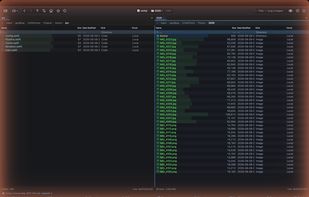
Unifyl is a dual-pane file manager built natively for macOS (Swift 6, SwiftUI + AppKit) that combines Total Commander's keyboard-first power with a design that belongs on a Mac, and adds local, on-device AI on top.
TOTAL COMMANDER MUSCLE MEMORY OUT OF THE BOX
F2 rename, F5/F6 copy/move, Tab to switch panels, Insert to toggle-select, numpad +/-/* group selection, and Select by Pattern with TC-style masks. 120+ remappable shortcuts with conflict detection, plus a command palette.
NATIVE macOS, NOT A PORT
macOS 14 Sonoma or later. Apple HIG, SF Symbols, Quick Look inside the panel, system tags, drag-and-drop, VoiceOver and WCAG 2.1 AA. The direct build is notarized and updates through Sparkle; a fully sandboxed Mac App Store edition is also available.
AI THAT RUNS ON YOUR MAC
Semantic search over file content, AI rename for images and documents, smart auto-tagging, and perceptual-hash near-duplicate detection. All of it runs through CoreML on the Apple Neural Engine, so your files never leave the device. No account, no telemetry.
EVERY PROTOCOL
FTP, FTPS and SFTP (PPK keys, FIDO2, 2FA), WebDAV and SMB. S3, Backblaze B2, Google Cloud Storage and Azure Blob. Google Drive, Dropbox, OneDrive and iCloud Drive. Docker containers and Kubernetes pods in the direct build.
BUILT FOR CJK POWER USERS
Unusual on macOS: ALZ archive extraction, HWPX (Hancom Office) inline preview without installing Hancom, Pinyin / Romaji / Hangul-Hanja filename search so typing "tokyo" matches ??, full-width to half-width search folding, CP949 / Shift-JIS / GBK to UTF-8 filename conversion with undo, and correct decoding of legacy CJK ZIP archives.
REAL FILE TOOLS
Three-way merge, recursive directory diff, bidirectional folder sync with a plan preview before it runs, SHA-256 verification after every copy and move, multi-rename with regex / EXIF / AI suggestions and one undo for the whole batch, archives browsable as virtual folders (ZIP, 7z, TAR, GZ, BZ2, XZ, ZSTD, RAR, including encrypted), an inline hex editor, an EXIF batch editor, checksums (CRC32, MD5, SHA-1/256/512, SHA-3, BLAKE3), and an automation engine for Shell, AppleScript and JXA.
TWO EDITIONS
The developer tools — Git panel, inline terminal, Docker and Kubernetes browsing, SSH tunnel manager, and the port and process viewers — are in the direct build only. They launch external processes, which the Mac App Store sandbox forbids. Everything else is identical.
PRICING
Free to download. The free tier includes all pane layouts, unlimited tabs and workspaces, filename plus Spotlight plus CJK multilingual search, FTP and SFTP, ZIP reading, and all 12 themes. Pro is a one-time $24.99 purchase, no subscription, and unlocks content search, archive writing, all cloud protocols, compare/sync/merge, multi-rename and the AI stack. There is a 14-day full Pro trial on first launch, and Pro works with Family Sharing.
15 languages including full right-to-left Arabic. Apple Silicon optimized, Intel supported.







 goodbug89 added Unifyl as alternative to Total Commander, ForkLift, Commander One, Path Finder and 7 more
 Oneteam


No comments or reviews, maybe you want to be first?