





ClipHearth
Like
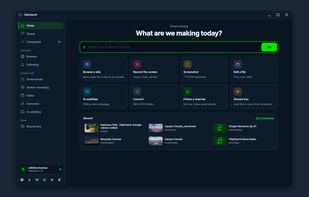
A cross-platform desktop workbench that detects video, live streams, radio, and playlists in its built-in browser, then captures, converts, and edits them. It supports subtitles, batch jobs, hardware encoding, GIF export, ad and tracker blocking, and signed updates.

Cost / License
- Pay once or Subscription
- Proprietary
Application typeApplication types
 EU
Since
- New
Platforms
- Mac
- Windows
- Linux


Features
Highlights All activities
ClipHearth News & Activities
Recent activities
 Slitherin added ClipHearth as alternative to ShareX, Greenshot, CleanShot X, OBS Studio and 2 more
- Slitherin added ClipHearth as alternative to ShareX, Greenshot, CleanShot X, OBS Studio and 2 more
- Paul updated ClipHearth
- Slitherin updated ClipHearth
 Slitherin added ClipHearth as alternative to Cobalt Tools
- Slitherin updated ClipHearth
- Slitherin updated ClipHearth
- Danilo Venom updated ClipHearth
- Slitherin added ClipHearth
 Slitherin added ClipHearth as alternative to SnapDownloader



Developed by
 ClipHearth
Licensing
Proprietary and Commercial product.Pricing
One time purchase that costs $44, and / or subscription that costs $10 per month.Alternatives
25 alternatives listedBadge
Get an embeddable badge for ClipHearthSupported Languages


No comments or reviews, maybe you want to be first?