
Certyneo Reader icon

Certyneo Reader

Free desktop PDF reader and word processor for Windows and Linux: read, annotate, fill in and redact PDFs, and write documents saved as PDF or Word, offline.
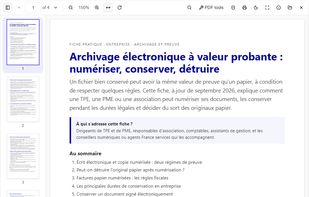
Certyneo Reader screenshot 1

Cost / License

  • Freemium
  • Proprietary

Application type

Platforms

  • Windows
  • Linux
0likes
0articles
Save

Features

  1.  Split PDF files
  2.  Fill PDF Forms
  3.  PDF compression
  4.  No registration required
  5.  Combine PDF
  6.  Dark Mode
  7.  PDF annotation
  8.  Full-Text Search
  9.  OCR
  10.  Ad-free
  11.  Works Offline
  12.  PDF Redaction

Certyneo Reader News & Activities

Highlights All activities

Recent activities

Certyneo Reader information

AlternativeTo Category

Office & Productivity
Certyneo Reader was added to AlternativeTo by certyneo on and this page was last updated .

No comments or reviews, maybe you want to be first?

What is Certyneo Reader?

Certyneo Reader is a free desktop PDF reader for Windows and Linux, with no account and no ads. It opens any PDF with a double-click, even offline, and can become your default PDF app.

Reading: full-text search, thumbnails, zoom, rotation, night mode, password-protected files and printing.

Beyond viewing: annotate PDFs (highlight, comment, draw), fill in PDF forms from the keyboard or turn a print-only document into a fillable form, assisted redaction (IBANs, social security numbers, emails and card numbers are proposed for masking), OCR, merge, split, compress and protect PDFs, watermarks, Bates numbering, and extraction of a PDF's text or tables. Batch processing handles several files at once, and the reader can verify a document's electronic signature.

Built-in word processor: styles, fonts, lists, tables, pictures, headers, footers and page numbers. It opens and saves Word (.docx) files and exports tagged PDFs with selectable text and embedded fonts.

Privacy: documents stay on your computer. Opening, reading, annotating or editing a PDF never uploads the file.

For IT teams: a per-machine MSI for Intune, GPO and SCCM, silent installation, and a machine policy file to control updates.

Pricing: free. Editing the text of PDFs you did not create requires an optional annual licence.