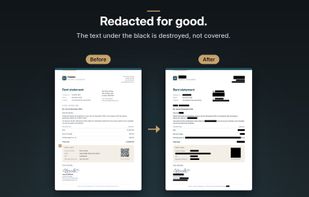
A black box drawn over a PDF often hides nothing: the text is still underneath, and selecting it is enough to read it. Caviar redacts for good, in PDFs and screenshots alike.
THE TEXT IS DESTROYED, NOT COVERED
On export, every page is redrawn as a 300 dpi image in a brand-new document. Whatever was under a black area no longer exists.
EVERY EXPORT IS CHECKED
Before writing the file, Caviar checks that every area is truly black in the delivered image and that no text remains. Otherwise, the export is refused.
DETECTION DOES THE HEAVY LIFTING
Names, postal addresses, email addresses, phone numbers, dates, amounts, IBANs and BICs, European VAT numbers, credit cards, vehicle identification numbers, IP addresses, GPS coordinates, passport MRZ lines, QR codes and barcodes, faces and handwritten signatures. Depending on your Mac's region and language, Caviar also recognizes social security numbers, tax IDs and license plates from some thirty countries across Europe, the United States and Canada. For France, also SIREN and SIRET numbers.
YOUR SCREENSHOTS TOO
Caviar opens images (PNG, JPEG, HEIC, TIFF…) just like PDFs. Drop a screenshot thumbnail onto the start screen, or give Caviar's action a keyboard shortcut in the Shortcuts app: select an area of the screen, Caviar redacts it, and the result can go straight to the clipboard, ready to paste into an email, a chat or an AI assistant. A sample shortcut is included.
YOU STAY IN CONTROL
Review mode shows each area one after another: accept or reject it with a single key. You can also draw your own areas and keep a list of words that are always redacted.
HIDDEN DATA GOES TOO
Metadata, attachments, scripts, annotations, revision history: by default, none of it reaches the delivered file.
EVERYTHING STAYS ON YOUR MAC
No account, no cloud, no network connection. Detection is local and deterministic.
AND ALSO
• Save next to the original, to a chosen folder or to the clipboard
• Several documents open in tabs
• Protected and locked PDFs
• "Open With" from the Finder
• Optional automatic export
• Built-in guide
• 25 languages






 EU


 carlos-cute added Caviar: PDF Redaction as alternative to PDF Expert, Redacted, BlurData, Redact PDF AI and 4 more
 CHARLES ALAIN CUTTAZ


No comments or reviews, maybe you want to be first?