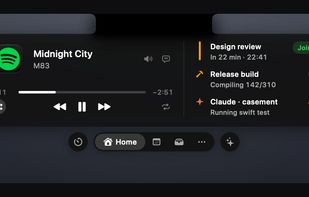
Casement turns the MacBook notch into a Dynamic Island.
Coding agents ask there. Claude Code, Codex and Cursor show what they are doing in the notch, and a permission request is answered from it with one click, without leaving the editor. Claude Code's and Codex's plan usage limits show beside the session; Cursor publishes no per-user figure, so it has none.
Your iPhone's Live Activities are mirrored into the notch instead of sitting behind it, and 137 apps have their own look. How much shows depends on the app: Casement reads the pill macOS draws through Accessibility, and where an app exposes almost nothing it leaves Apple's own pill alone rather than covering it with less.
Now Playing comes from any app, browsers included, with synced lyrics, a scrubber that seeks and an output picker, and small app icons switch between every player macOS lists. Meetings count down beside the notch and wait with a Join button until you join. There is a file shelf you drop files on, clipboard history and download progress, and eleven further tools, among them to-dos, a note, a converter, emoji, the weather, a camera mirror, a teleprompter and stocks, each off until you turn it on.
Anything that can run a command, open a URL or make an HTTP request can put its own activity in the notch, and an iPhone Shortcut can push one over the local bridge.
It is free and MIT licensed, written in Swift with no third-party dependencies. There is no account, no telemetry and no licence server, and nothing reaches the network until you switch on something that needs it. Each permission is asked for only when you turn on the feature that needs it. It works with VoiceOver and the keyboard, and honours Reduce Motion and Increase Contrast.
It needs macOS 14 or later and a Mac with a notch. Mirroring your iPhone's Live Activities needs macOS 26 and has been tested on macOS 27 only.






 Aviral Garg added Casement for Mac as alternative to NotchNook, Alcove, The Boring Notch, Tuneful and 35 more
 Aviral Garg


No comments or reviews, maybe you want to be first?