Captures is a Windows screen capture tool built for people who are tired of paying annual software subscriptions. Unlike Snagit which moved to subscription-only pricing in 2025 at $39 per year, Captures is $24.99 once and you own it forever. No renewal, no expiration, no account required.
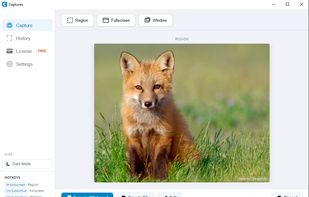
Three capture modes cover every use case. Region capture lets you draw a precise rectangle anywhere on screen. Fullscreen capture grabs your entire display instantly including multi-monitor setups. Window capture isolates any open application with one click, no manual cropping needed. Scrolling capture takes full-page screenshots by stitching together frames as you scroll through long web pages or documents.
Global hotkeys work from any application and are fully customizable including the ability to remap PrintScreen. Persistent history automatically saves your last 50 captures with both original and edited versions kept separately. One-click copy sends any capture straight to the clipboard. Auto-copy mode sends every new capture to the clipboard automatically.
Annotation tools include boxes, highlights, color picker with eyedropper support, resize and move handles, and full undo support. Dark mode is built in and remembers your preference across sessions.
All data stays on your computer. No cloud storage, no tracking, no account required, no admin rights needed for installation. The free tier includes all features with a watermark on captures. Pro removes the watermark permanently for a one-time payment of $24.99 with all version 1.x updates included.
Domain investors will find a useful bonus feature — screenshot any domain list from any marketplace and Captures extracts all domain names automatically into a clean list ready to copy to a spreadsheet or paste as text.
Available for Windows 10 and Windows 11.
Built in San Antonio, TX.







 Captures

No comments or reviews, maybe you want to be first?