
Cap+ Studio icon
Cap+ Studio icon

Cap+ Studio

 1 like

Screen capture, recording and quick editing photo, audio, video and gifs for Windows, with independent audio source selection.
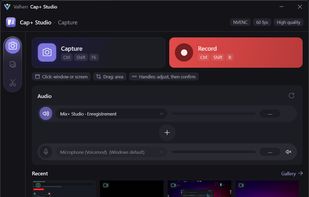
Main Window

Cost / License

  • Pay once
  • Proprietary

Application type

Since

  • New

Platforms

  • Windows  Requires Windows 10 version 2004 or later, or Windows 11.
1like
0articles
Save

Features

Properties

Features

Highlights All activities

Cap+ Studio News & Activities

Recent activities

Cap+ Studio information

  • Developed by

    FR flagValherr
  • Licensing

    Proprietary and Commercial product.
  • Pricing

    One time purchase (perpetual license) that costs $8.
  • Alternatives

    14 alternatives listed
  • Badge

    Get an embeddable badge for Cap+ Studio
  • Supported Languages

    • English
    • French

AlternativeTo Categories

Photos & Graphics, Video & Movies, Audio & Music
Cap+ Studio was added to AlternativeTo by Valherr-App on and this page was last updated .

No comments or reviews, maybe you want to be first?

What is Cap+ Studio?

Cap+ Studio is a screen capture and recording app for Windows 10 and 11, made by Valherr, made to make our lives easier and every actions, smoother.

Its main strength is audio routing: you choose exactly which device to record for PC sound and for the microphone (speakers, headset, Voicemeeter virtual lines…), without changing the Windows default device. Each source has its own live level meter.

Features:

  • Capture bar with a global shortcut: click a window or drag a region
  • PNG screenshots on a frozen screen, with direct annotation (pen, highlighter, arrows, shapes, text)
  • Scrolling capture for long pages and conversations
  • Text recognition (OCR) built on Windows
  • MP4 recording encoded by the graphics card (NVIDIA NVENC, Intel Quick Sync, AMD AMF), GIF export
  • Audio-only recording to M4A, MP3 or WAV
  • Quick editing: trim, per-track volume, fades, added audio, and up to 5 clips assembled in one click
  • Add animated elements with a transparent background (logos, transitions, "Subscribe" buttons) on top of your video: transparency is detected automatically and kept in the export
  • The finished video is copied to the clipboard: paste it straight into Discord with Ctrl+V
  • 0% CPU when idle
  • English and French interface
  • Lots of Parameters to give you the best experience ( you can switch on and off many things)

Cap+ Studio is free during its open beta so more things can and will be added, however it will become a paid app with a free trial on the Microsoft Store.