CADClone icon
CADClone icon

CADClone

Free, web-based 2D CAD software with native AutoCAD CLI parity, DXF & PDF support, ABNT blocks library, and full offline PWA capability.
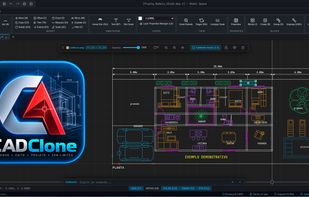
CADClone screenshot 1

Cost / License

  • Free
  • Open Source (MIT)

Platforms

  • Online  Works in all modern browsers and can be installed on desktop and mobile as an offline Progressive Web App (PWA).
Alternatives
1like
0alternatives
0articles

Features

Properties

  1.  Lightweight
  2.  Privacy focused

Features

  1.  Built-in Color Picker
  2.  No registration required
  3.  Works Offline
  4.  No Coding Required
  5.  Dark Mode
  6.  Ad-free
  7.  WYSIWYG Support
  8.  No Tracking
  9.  Live Preview
  10.  Progressive Web App

CADClone News & Activities

Highlights All activities

Recent activities

CADClone information

AlternativeTo Category

Photos & Graphics

GitHub repository

  •  0 Stars
  •  0 Forks
  •  0 Open Issues
  •   Updated  
View on GitHub
CADClone was added to AlternativeTo by Fabiano Braga on and this page was last updated .
No comments or reviews, maybe you want to be first?

Official Links

What is CADClone?

CADClone is a lightweight, modern, and zero-installation 2D Computer-Aided Design (CAD) application running directly in the browser and as an offline Progressive Web App (PWA). Designed for architects, engineers, designers, and students, it provides a familiar drafting experience with full AutoCAD-compatible command line parity and standard keyboard shortcuts.

Key Highlights:

  • AutoCAD-Compatible Command Line: Type standard shortcuts like L (Line), REC (Rectangle), C (Circle), M (Move), CP (Copy), RO (Rotate), TR (Trim), EX (Extend), O (Offset), F (Fillet), CHA (Chamfer), DIM, H (Hatch), and PURGE.
  • DXF Import & Export: Full client-side DXF parsing and export, ensuring seamless round-trip interoperability with AutoCAD, LibreCAD, QCAD, and standard vector software.
  • PDF Underlay & Calibrate: Import architectural PDF blueprints or satellite imagery as canvas background underlays, calibrated to exact real-world scale (1:1) with a two-point distance reference.
  • Multi-Tab Workspace: Open and edit multiple drawings concurrently with independent undo/redo stacks, layers, and viewports.
  • Paper Space Layouts & PDF Vector Export: Switch between Model Space and Paper Space (A4, A3, A2, A1, A0) in Portrait or Landscape orientations, complete with technical title blocks and direct print to vector PDF.
  • Intelligent OSNAP Engine: Magnetic object snapping supporting Endpoint, Midpoint, Center, Intersection, Perpendicular, Tangent, Nearest, and Quadrant with visual markers.
  • Built-in ABNT & Architectural Blocks: Ready-to-use symbol library including doors, windows, sanitary fixtures, electrical symbols, furniture, north arrows, and level markers.
  • 100% Offline & Private: Works completely offline via Service Workers and local caching. Your drawings never leave your browser unless you choose to export them.