
CAD Blocks icon
CAD Blocks icon

CAD Blocks

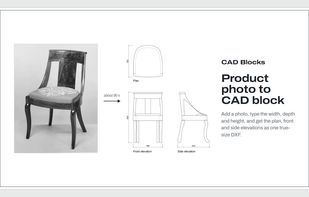
CAD Blocks turns a furniture product photo into a true-size 2D CAD block (plan, front and side elevations) as a DXF for AutoCAD, Revit, SketchUp and Vectorworks.
CAD Blocks screenshot 1

Cost / License

  • Freemium (Pay once or Subscription)
  • Proprietary

Platforms

  • Online
  • Software as a Service (SaaS)
0likes
0articles
Save

Features

CAD Blocks News & Activities

Highlights All activities

Recent activities

CAD Blocks information

  • Developed by

    GB flagDevin Jones
  • Licensing

    Proprietary and Freemium product.
  • Pricing

    One time purchase ranging between $15 and $300, and / or subscription ranging between $24 and $89 per month + free version with limited functionality.
  • Alternatives

    3 alternatives listed
  • Badge

    Get an embeddable badge for CAD Blocks
  • Supported Languages

    • English

AlternativeTo Categories

Home & Family, Photos & Graphics
CAD Blocks was added to AlternativeTo by Devin-Jones on and this page was last updated .

No comments or reviews, maybe you want to be first?

What is CAD Blocks?

Interior designers spend hours drawing furniture they didn't design. Every sofa, chair and lamp on an FF&E schedule has to go into the plans and elevations, and most makers don't publish CAD files.

CAD Blocks draws them for you. Paste a link to the product's page, or add a photo, a screenshot or a PDF spec sheet, and type the width, depth and height. About 90 seconds later you get one DXF holding three named blocks: the plan, the front elevation and the side elevation, drawn true size in millimetres or inches.

It's built with a working interior designer, around how designers really draw:

  • Every view is fitted to the exact size you type
  • Hidden edges are dashed, and blocks sit on layer 0 or on I-FURN layers
  • The maker, model and dimensions travel with the block as attributes
  • Resizing a finished block is free

The DXF opens in AutoCAD, Revit, SketchUp Pro, Vectorworks and Chief Architect. 3 blocks a month are free, with no card. Paid plans add more blocks, and the Studio plan shares blocks and one library between up to five people.
