

Bytesweep icon
Bytesweep icon

Bytesweep

 Like

Bytesweep is a disk cleaner for Mac, Windows and Linux that asks first. It shows what is filling your disk, you choose what goes, and anything cleaned can be put back for 7 days.
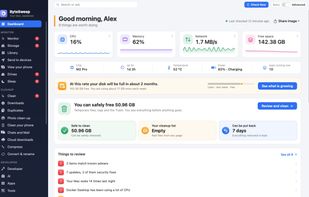
Dashboard: your Mac at a glance

Cost / License

  • Pay once
  • Proprietary

Application type

Since

  • New

Platforms

  • Windows
  • Mac  macOS 14 or later
  • Linux
  • Android
  • iPhone
0likes
0articles
Save

Features

Features

Highlights All activities

Bytesweep News & Activities

Recent activities

Bytesweep information

  • Developed by

    Bytesweep
  • Licensing

    Proprietary and Commercial product.
  • Pricing

    One time purchase (perpetual license) ranging between $9 and $30.
  • Alternatives

    9 alternatives listed
  • Badge

    Get an embeddable badge for Bytesweep
  • Supported Languages

    • English

AlternativeTo Categories

OS & Utilities, File Management, System & Hardware

Popular alternatives

View all
Bytesweep was added to AlternativeTo by Faheen-Ahamed on and this page was last updated .

No comments or reviews, maybe you want to be first?

Official Links

What is Bytesweep?

Bytesweep is a disk cleaner for Mac, Windows and Linux that asks first. It shows what is filling your disk, you choose what goes, and anything cleaned can be put back for 7 days.

Everything it finds is rated safe to clear, review first or keep, and only the safe things are ticked for you. It clears temporary files, old logs, the Trash, leftovers from updates and removed apps, and app and browser caches.

Also included:

  • Duplicates: identical files, photos and videos that look alike, and folders that are copies of each other.
  • Organize a folder: sort Downloads or any folder by kind, by date, or photos by the place they were taken. You see the plan first, and Undo puts everything back.
  • Library: describe a file or a picture in plain words and Bytesweep finds it.
  • A page for Xcode, Docker and other developer files.
  • On Mac: what System Data is, why your Mac woke up last night, app updates in one list, live monitoring and file recovery.
  • Send to your devices: files, folders, notes or links to your phone or another computer over your Wi-Fi.

Basic mode explains your disk in plain words; one switch turns on Advanced, with every number.

Free to try, then a one-time purchase with no subscription.