
Bulletin Infinite Canvas icon

Bulletin Infinite Canvas

Bulletin is an infinite canvas for anything you can imagine — mood boards, mind maps, plans, habit trackers, or a home for everything you keep meaning to get to. Add blocks, arrange them however you like, and make every one of them look exactly the way you want.
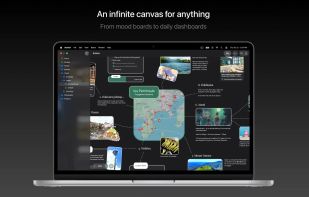
Bulletin Infinite Canvas screenshot 1

Cost / License

  • Freemium (Pay once)
  • Proprietary

Application type

Platforms

  • Mac
  • iPhone
  • iPad
1like
0articles

Features

Properties

  1.  Privacy focused
  2.  Customizable

Features

  1.  Ad-free
  2.  No registration required
  3.  Dark Mode
  4.  No Tracking
  5.  Cloud Sync
  6.  Works Offline
  7.  Calendar View
  8.  Freeform notes
  9.  Integrated Search
  10.  Blocks
  11.  Sync with iCloud
  12.  Infinite canvas
  13.  Progress tracking

Bulletin Infinite Canvas News & Activities

Highlights All activities

Recent activities

Bulletin Infinite Canvas information

  • Developed by

    SG flagIn The Middle
  • Licensing

    Proprietary and Freemium product.
  • Pricing

    One time purchase (perpetual license) that costs $40 + free version with limited functionality.
  • Alternatives

    16 alternatives listed
  • Badge

    Get an embeddable badge for Bulletin Infinite Canvas
  • Supported Languages

    • English
    • Chinese
    • French
    • German
    • Italian
    • Japanese
    • Korean
    • Portuguese
    • Spanish

AlternativeTo Category

Office & Productivity

Popular alternatives

View all
Bulletin Infinite Canvas was added to AlternativeTo by Paul on and this page was last updated .
No comments or reviews, maybe you want to be first?

Official Links

What is Bulletin Infinite Canvas?

Bulletin is an infinite canvas for anything you can imagine — mood boards, mind maps, plans, habit trackers, or a home for everything you keep meaning to get to. Add blocks, arrange them however you like, and make every one of them look exactly the way you want.

BLOCKS TO BUILD WITH • Image — photos and animated GIFs, with a built-in cropper • Text — rich text in any font on your device • Shape — rectangles, diamonds and circles, with text inside for diagrams • Line & Arrow — snap to blocks and keep following them as they move, with customizable heads at either end of an arrow • Link — paste a URL for a preview card, or embed the live site right on your board • Drawing — sketch with Apple Pencil on iPad, and view it on every device

POWERFUL PRO BLOCKS • Todo List — nest tasks as deep as you like, and drag them between blocks to build your own Kanban • Progress Bar — a simple, satisfying visual indicator • Recurring Tracker — progress or checkmark style, for habits, chores and anything that repeats • Calendar Tracker — a beautiful calendar heatmap • More on the way

MADE TO BE YOURS • Style it block by block — board background, fonts, colors, padding, corner radius, borders, shadows, rotation. Nobody should be locked into one design. • A real infinite canvas — built natively for speed, so your board can grow as large as you want • Search — find any block from anywhere in the app, and choose which blocks are searchable. Boards and blocks appear in Spotlight too, and open right where you left them. • Folders — organize boards into folders, nested as deep as you need • Scenes — save named views of a board and jump straight back to them • Light and dark — pick your appearance and design for both; your colors are saved separately for each

SYNC AND SHARING • iCloud sync — design on your Mac and pick it up on iPad or iPhone, right where you left off • iCloud sharing — invite people to collaborate on a board • Yours alone — everything lives in your own iCloud. No accounts, no tracking, no data collection. Works offline.

Bulletin is free: unlimited boards, unlimited basic blocks, and up to 5 Pro blocks at a time. Unlock Bulletin Pro with a single one-time purchase — no subscriptions, ever — for unlimited Pro blocks. Bulletin Pro supports Family Sharing, so one purchase covers your whole family.
