Arialine brings Mermaid diagrams and AI diagram generation to Slack. Teams design systems in Slack threads, but diagrams often live elsewhere, fall out of date, and lose the reasoning behind them.
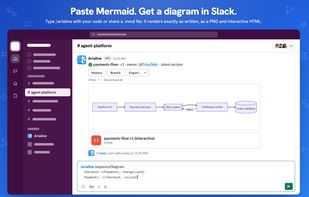
Paste Mermaid or describe a system in plain language and Arialine posts the result as a PNG and HTML file. Edit it by replying in the thread; every change becomes a version linked to the Slack message behind it. Works on every Slack plan, including Free.
AI disclaimer: Arialine uses large language models to generate and edit diagrams from descriptions. AI output can be inaccurate or incomplete — review diagrams before relying on them.
Render Mermaid in Slack: type /arialine followed by Mermaid code, or /arialine alone to open the form. Valid code renders exactly as written, with no AI or quota. You can also mention @Arialine with a Mermaid code block, share a .mmd file, or use Render as diagram.
Arialine runs Mermaid 12 with ZenUML and supports flowchart, sequence, class, state, ER, C4, Gantt, pie, mindmap, timeline, git graph, Sankey, XY, kanban, architecture, radar, treemap, swimlane, use case, event modeling, Venn, Ishikawa, Wardley map, Cynefin, railroad, agent flow and more: https://arialine.app/use-cases/mermaid-diagram-types-in-slack
Create with AI: mention Arialine, e.g. “@Arialine 2FA sequence diagram,” or use Render as diagram. Arialine writes the Mermaid and posts an editable board.
Turn discussions into diagrams: write “@Arialine diagram what we decided” or “add that.” Recent channel discussion becomes context, so reviews, incident timelines and planning threads can become diagrams without copy-pasting.
Edit, version and explain: reply in the board thread, e.g. “@Arialine add a retry step after Payment.” Changes can apply directly or arrive as proposals. Every edit becomes a version with undo, rewind and branch. Ask why an element exists and Arialine cites the decision, author, date and message. A decision record is kept in Slack Canvas, or in the thread on Slack Free.
Markdown to Slack Canvas: share a .md file or use Render as canvas. Arialine creates a native Slack Canvas with headings, lists, tables and code, and renders Mermaid blocks as images: https://arialine.app/use-cases/markdown-to-slack-canvas
Export .mmd, PNG, SVG, or PDF reports for one or several versions. Interactive HTML supports pan, zoom, source and history and works outside Slack.
Privacy: admins can disable storage for pasted Mermaid so it is rendered once and never saved. Each channel can choose PNG, HTML, or both.
Slackbot: Arialine exposes an MCP server, so supported Slack plans can use Slack’s AI assistant to create and edit diagrams and inspect history.
Pricing: Free includes all features with 3 boards, up to 8 versions each, 10 AI generations per workspace per day, and unlimited valid pasted Mermaid renders. Team removes limits and adds high-resolution PNGs for one flat workspace price, not per seat: https://arialine.app/pricing







 inxanity added Arialine - Mermaid and AI Diagrams as alternative to draw.io, Excalidraw, AFFiNE, DeepNotes and 47 more
 Andrii Haiduk

No comments or reviews, maybe you want to be first?