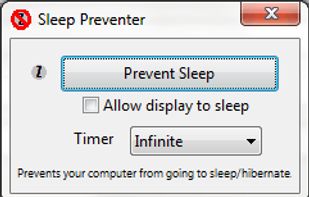
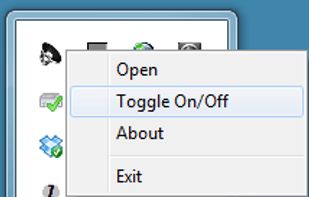
Prevents your computer from going to sleep, hibernate, dim the display or start the screensaver. Application runs in the system tray when closed. New in version v1.3: -Parameter support. v1.2: Option to let display fall asleep. v1.1: Sleep timer.


BuhoSleep is described as 'Lightweight Windows tray tool preventing sleep, keeping screens on, and switching power plans using Windows API, with timers, hotkeys, and automatic mode selection' and is a prevent sleep mode app in the os & utilities category. There are more than 25 alternatives to BuhoSleep for a variety of platforms, including Mac, Windows, Android, F-Droid and Web-based apps. The best BuhoSleep alternative is Caffeine for Mac, which is both free and Open Source. Other great apps like BuhoSleep are Amphetamine, Caffeine for Windows, caffeinate & disablesleep and Stimulator.
Prevents your computer from going to sleep, hibernate, dim the display or start the screensaver. Application runs in the system tray when closed. New in version v1.3: -Parameter support. v1.2: Option to let display fall asleep. v1.1: Sleep timer.


Prevent your Mac from falling asleep, dimming your screen or starting the screensaver. Theine keeps macOS awake just like caffeine does with you.


Simulates activity (=> disables screensaver and powersaving) while running programms (any .exe) from a choosen directory. Main purpose is to choose the steam directory to disable monitor powersaving while running steam games.

Coffee allows you to keep the display awake without having to change the device settings. It can be toggled at various places:

Keep your screen on when your device is running your GPS application, favorite remote control, playing a movie or slideshow, etc... Perfect to keep your screen on without dimming for application development. Your screen will never go back to sleep until you want it to...


This software helps you keep Windows awake when the PC is in use. Windows will transition to standby if the keyboard and mouse is idle for a long time, except if something is blocking sleep. Programs can signal the system to avoid sleep.


Wakey is my version of application which keeps your PC awake. It was inspired by Awake utility which was a part of Microsoft's PowerToys.


Jiggle Mouse keeps your computer active with subtle, natural cursor movements — so your screen stays on and your status stays green on Teams & Slack.


ScreenWakeUp is a free, browser-based tool that keeps your screen from sleeping or locking. It uses the modern Screen Wake Lock API — nothing to install, no admin rights, no account. Open it in any browser on Windows, macOS, Linux, ChromeOS, Android or iPhone and click one...