Brightintosh Alternatives

Brightintosh is described as 'BrightIntosh is lightweight, works system-wide, has optional launch-at-login functionality and includes a global hotkey to toggle the extra brightness' and is a Screen Dimmer. There are more than 25 alternatives to Brightintosh for a variety of platforms, including Mac, Windows, Linux, Android and Chrome OS apps. The best Brightintosh alternative is Twinkle Tray, which is both free and Open Source. Other great apps like Brightintosh are Solace, Dimly, MonitorControl and Dimmer.

Copy a direct link to this comment to your clipboard
Brightintosh alternatives page was last updated

Alternatives list

  1. The program is designed to adjust the brightness of monitors, laptop displays and other equipment. Runs on Windows 7+ and does not require installation. Works with all external monitors that have DDC/CI support, as well as with built-in displays of laptops, all-in-ones and...

    Cost / License

    • Free
    • Proprietary

    Application type

    Platforms

    • Windows
     
  2. QuickShade icon
     2 likes

    A macOS app to quickly change the brightness of your Mac.

    Cost / License

    • Free
    • Proprietary

    Application type

    Platforms

    • Mac
     
  3. TotalXDR icon
     2 likes

    TotalXDR is a macOS menubar app that removes the brightness limit of your MacBook Pro display and keeps XDR/HDR brightness always on.

    Cost / License

    • Paid
    • Proprietary

    Platforms

    • Mac
     
  4. EyeSavior icon
     2 likes

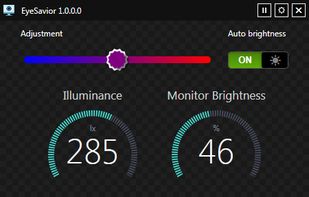
    EyeSavior is Windows utility that allows changing monitor brightness from desktop. You can change monitor brightness manually or if you have hardware light sensor monitor brightness will be changed automatically according to your settings.

    Cost / License

    • Free
    • Proprietary

    Platforms

    • Windows
     
  5. Simple Screen Brightness is a small portable application written in C# that allows you to adjust the brightness for all of your connected monitors using a slider without having to use their difficult-to-use built-in menu systems.

    Cost / License

    • Free
    • Open Source

    Platforms

    • Windows
     
  6. Brisync icon
     3 likes

    Synchronize your external monitor brightness with built-in display. Application reads current brightness of your built-in display and passes it to external monitors via DDC interface. You can adjust brightness by menu in system status bar.

    Cost / License

    • Free
    • Open Source (MIT)

    Platforms

    • Mac
     
  7. Monitor Bright reduces with a simple trick the monitor brightness. Useful to use the PC at night without getting blind if the minimum brightness that can be obtained adjusting monitor settings is still too high if compared to ambience brightness. Supports multi monitor systems.

    Cost / License

    • Free
    • Proprietary

    Application type

    Platforms

    • Windows
     
  8. Dim any screen and keep color accuracy.

    Cost / License

    • Paid
    • Proprietary

    Application type

    Platforms

    • Mac
     
  9. JoyScreen icon
     Like

    Focus view, extra brightness, ambient glow, and keep awake — all from your menu bar. JoyScreen transforms how you use your Mac.

    Cost / License

    • Paid
    • Proprietary

    Platforms

    • Mac
     
  10. Free and Open Source alternative to Vivid macOS application to extend Apple XDR display brightness from 500 up to 1600 nits.

    Cost / License

    Platforms

    • Mac
     
  11. If you work in a dark room, or in room lit by the sun, or struggle with eye strain and headache, Simple Screen Shade will dim your displays - this way it will care for your health and comfort.

    Cost / License

    • Paid
    • Proprietary

    Platforms

    • Mac
     
You are at page 3 of Brightintosh alternatives