


BleachBit
BleachBit deletes unnecessary files such as cache and cookies to enhance privacy and disk space efficiency on Linux and Windows. It supports numerous applications including web browsers, office suites, and multimedia tools.
Cost / License
- Free
- Open Source (GPL-3.0)
Application types
Platforms
- Mac
- Windows
- Linux
- Blackberry
- PortableApps.com
- Flathub

Features
Properties
- Privacy focused
- Lightweight
Features
- Ad-free
- File Shredder
- Selective Wipe
- Delete Temporary Files
- Portable
- Works Offline
- Multiple languages
- No Tracking
- Dark Mode
- Works in a terminal
- Disk Maintenance
- No registration required
- Photo Recovery
- Command line interface
- Recover Corrupted Files
- NTFS Partition Recovery
BleachBit News & Activities
Recent News
- Fla published news article about Linux Lite
 Linux Lite 7.8 releases 12 rewritten apps and expands software selection
Linux Lite 7.8 introduces 12 key applications fully rewritten with Python and GTK4 as the distribut...
- POX published news article about BleachBit
 Cleaning software BleachBit 5.0 adds security upgrades, cleaner enhancements, and more
BleachBit 5.0 has arrived with a suite of improvements aimed at delivering a stronger, more reliabl...
- POX published news article about BleachBit
 Popular system cleaner BleachBit releases version 4.6.0 with many enhancements
BleachBit, the well-known free and open source system cleaner, has announced the release of its lat...


Recent activities
 dbfx added BleachBit as alternative to Kudu Cleaner
- leandrormaced097 liked BleachBit


Featured in Lists

This is the apps for Windows 11 that I would recommend to anyone who just got a PC ! The same list for

This is going to be a list of the free tools/software that can be used mostly in any field. it's based on websites …

A list with 202 apps by christineconnor without a description.
What is BleachBit?
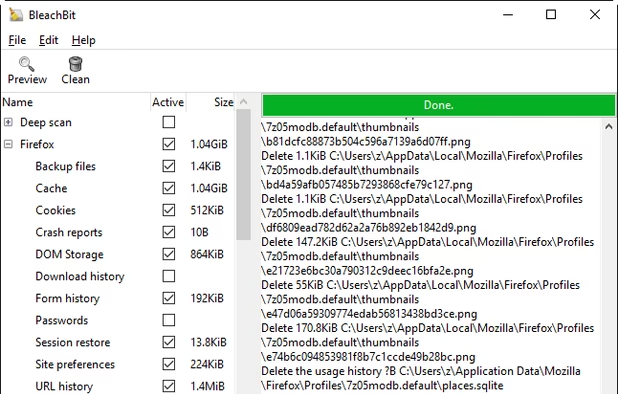
BleachBit deletes unnecessary files to free valuable disk space, maintain privacy, and remove junk.
Rid your system of old clutter including cache, cookies, Internet history, localizations, logs, temporary files, and broken shortcuts.
Designed for Linux and Windows systems, it wipes clean  Adobe Acrobat Reader, APT, Bash,
  Beagle,
  Chromium, Epiphany,
  Mozilla Firefox, Flash, GIMP, Google Chrome, Google Earth, Internet Explorer, Java, KDE, OpenOffice.org, Opera, RealPlayer, Safari, Second Life viewer,
  Skype, VIM, XChat, Yum, and more.
BleachBit has never bundled any junk like browser toolbars.
BleachBit information
Developed by
 Andrew Ziem
 Licensing
Open Source (GPL-3.0) and Free product.Written in
Rating
Average rating of 4.4Alternatives
163 alternatives listedNews
3 news article related to BleachBitSupported Languages
- English

AlternativeTo Categories
OS & Utilities, System & Hardware, Security & PrivacyGitHub repository
- 4,527 Stars
- 331 Forks
- 310 Open Issues
- Updated


Comments and Reviews
Open source app Bleachbit is works wonders for removing all kinds of residual files and other traces of activity on your Windows or Linux computer. It is therefore a privacy- and security-enhancing tool. Security researcher Bruce Schneier, who handled some of the leaked Snowden files, has used Bleachbit (amongst other things) to keep his computer clean and secure against NSA spying.
Bleachbit is also allegedly the app Hillary Clinton (or her staff) used to erase those infamous emails. Hillariously (pun partially intended), during one of the 2016 US presidential debates, Donald Trump accused Hillary Clinton of "bleaching" her emails, calling it "a very expensive process".
Rest assured that Trump made that up: Bleachbit is open source, free, and costs nothing to use. Oh, and also you don't have to pay for it. (Except perhaps that its use might attract misleading statements from Donald Trump.)
It's an unsophisticated, sluggish program.
Every time you clean up, all tasks are slowed down by meaningless inspection tasks.
Works good. Use it.
BleachBit is, in my opinion, the best system cleaning software out there. It’s open-source, completely free, and very effective. However, it would be great if it included a few more features, such as a cookie whitelist option and the ability to skip wiping free disk space when using an SSD. Advanced users can make it even more powerful by adding the “winapp2.ini” list — but that’s only recommended for experienced users.
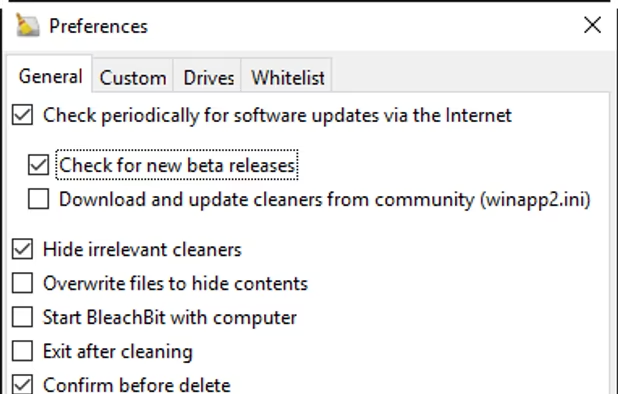
BleachBit's custom cleaner system is a bad joke. No UI, no error messages, just XML raw-dogging and silent failure and missing cleaners if you don't pet it exactly the way it wants you to. The "Hide irrelevant cleaners" setting sometimes just hides your work instead of telling you why.
You can't whitelist cookies. The default cleaners for some browsers (e.g. Brave) are mysteriously duplicated.
Variable expansion is flaky as hell. It sets weird permissions on its own AppData folder, for no good reason.
If you want a cleaner you can actually configure without losing your mind, run. This tool is a steaming pile of XML hell, horrible UX, and false hope.
BleachBit? More like BleachMyPatience. Avoid.
If you can't whitelist cookies, it just isn't a great cleaner. Update Dec 2025: Word is that Bleachbit is working on a whitelist feature in future version 5.2. Another point is that it doesn't automatically close browsers like Brave. Glarysoft got better and it's my go-to. Wise Disk Cleaner is looking like a secondary for quick single browser cleanups.
You can't whitelist cookies? 🙁 Hmmm!
CCleaner was good. Then it got bundleware, then got bloated. It just lost its charm. Avast has ruined it.
BleachBit, on the other hand, is a privacy respecting and open source cleaner. It does a really good job at performing a deep clean and empowers you to be selective in removals. The file shredding is another brilliant component.
This belongs in your OS cleaning toolkit. It does exactly what it says on the tin.