


AweSun Remote Desktop
1 like
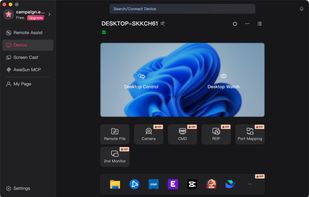
Cross-platform remote desktop for PC-to-PC and mobile-to-PC access, file transfer, remote support, and advanced remote control.

Cost / License
- Freemium (Subscription)
- Proprietary
Application type
Platforms
- Mac
- Windows
- Android
- iPhone
- iPad


Features
AweSun Remote Desktop News & Activities
Highlights All activities
Recent activities
 Neville-Gee added AweSun Remote Desktop as alternative to DeskJoin Screen
 Sam Kelton added AweSun Remote Desktop as alternative to DeskVNC
 Hownhownx added AweSun Remote Desktop as alternative to RemoteDesk
- Hownhownx thinks Game Streaming is a important feature of AweSun Remote Desktop
- Hownhownx thinks Portable is a important feature of AweSun Remote Desktop
I started using it six months ago. AweSun is truly a convenient remote desktop access tool; I appreciate how easy it is to connect, allowing me to access my computer from anywhere without complex configuration. It perfectly meets my needs for remote work and occasional remote access. The only downside is that it doesn't yet support Linux; my family members use Linux, so they can't use AweSun for the time being.
- wenfangfff-rgb updated AweSun Remote Desktop
- Hownhownx liked AweSun Remote Desktop
- wenfangfff-rgb updated AweSun Remote Desktop
- wenfangfff-rgb updated AweSun Remote Desktop


AweSun Remote Desktop information
Developed by
 IGG SINGAPORE PTE. LTD.
 Licensing
Proprietary and Freemium product.Pricing
Subscription + free version with limited functionality.Alternatives
24 alternatives listedBadge
Get an embeddable badge for AweSun Remote DesktopSupported Languages
AlternativeTo Categories
Remote Work & Education, Security & Privacy, Network & Admin, Video & Movies, OS & Utilities, System & Hardware, Gaming SoftwareApple AppStore
- Updated
- 3.97 avg rating



Comments and Reviews
I started using it six months ago. AweSun is truly a convenient remote desktop access tool; I appreciate how easy it is to connect, allowing me to access my computer from anywhere without complex configuration. It perfectly meets my needs for remote work and occasional remote access. The only downside is that it doesn't yet support Linux; my family members use Linux, so they can't use AweSun for the time being.