
AutoBoot icon
AutoBoot icon

AutoBoot

 1 like

AutoBoot is a cross-platform OS deployment tool that creates a universal bootable USB drive, automatically reboots into a live portal via UEFI BootNext, and installs operating systems and pre-selected applications over the network without manual ISO handling.
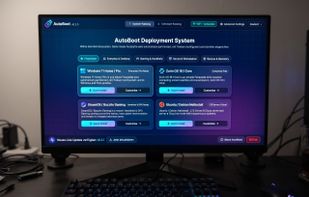
OS-Menu

Cost / License

  • Free
  • Proprietary

Application type

Since

  • New

Platforms

  • Windows
  • Linux
1like
0articles
Save

Features

Properties

Features

Highlights All activities

AutoBoot News & Activities

Recent activities

AutoBoot information

AlternativeTo Category

CD/DVD Tools

Popular alternatives

View all
AutoBoot was added to AlternativeTo by Marcel Weller on and this page was last updated .

No comments or reviews, maybe you want to be first?

What is AutoBoot?

AutoBoot streamlines operating system installation and initial system setup by replacing manual ISO downloads, repeated USB flashing, and BIOS boot-menu navigation with a single universal live environment. Using the AutoBoot Launcher (available for Windows and Linux), users prepare one reusable bootable USB flash drive. During creation, the launcher sets the one-time UEFI BootNext variable, allowing the system to boot directly into the AutoBoot live portal on the next restart without altering permanent boot orders or requiring manual BIOS key presses. Once booted into the live environment, users can select an operating system along with a curated set of standard applications and utilities to be deployed automatically over the network. Key Features: Universal Live Boot Drive: Eliminates the need to download and flash separate multi-gigabyte ISO files for every installation. Zero-Touch UEFI Reboot (BootNext): Automatically boots into the deployment environment on the next startup while leaving permanent firmware boot settings untouched. Network-Based OS & App Deployment: Select supported operating systems (currently Windows 11 and Zorin OS in beta, with additional distributions planned) and essential software packages in one workflow. Cross-Platform Launcher: Runs as a standalone executable on Windows and as a Flatpak package on Linux.

Flash Once, Always Up-to-Date – 100% Official Vendor ISOs & No TPM 2.0 Check ​Self-Updating Boot Drive: Flash your USB stick once and never re-flash it again. Newly added operating systems and software packages automatically appear in the live portal at boot. ​Always the Latest Official ISO: AutoBoot never distributes modified or third-party ISOs. It automatically fetches the latest unmodified release directly from the official vendor servers (e.g., Microsoft, Zorin). ​Windows 11 Without TPM 2.0 Check: Install the latest official Windows 11 release seamlessly on older hardware or virtual machines with automatic TPM 2.0 bypass during setup. ​Zero-Touch UEFI Reboot (BootNext): Boots directly into the live deployment portal on restart without manual BIOS boot-menu navigation.