





Audiotype
35 likes
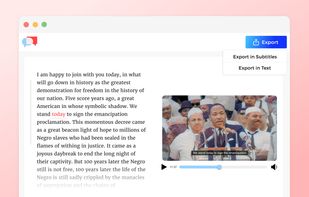
Automated platform offering quick, accurate audio and video transcription into editable text or subtitles in over 30 languages, with options for smart punctuation, file uploads from cloud storage services, secure payment, free trial, and team collaboration.

Cost / License
- Freemium (Pay once)
- Proprietary
Application type
 EU
EUPlatforms
- Online


Features
Highlights All activities
Audiotype News & Activities
Recent News
No news, maybe you know any news worth sharing?
Share a News Tip
Recent activities
 Paul added Audiotype as alternative to Reed Dictation
 Christian Sass added Audiotype as alternative to Vibe Typer
 Purinda-Gunasekara added Audiotype as alternative to LiveTranscribe
 Shejan Mahamud added Audiotype as alternative to Whisprtypr


Developed by
 Audiotype
 Licensing
Proprietary and Freemium product.Pricing
One time purchase (perpetual license) + free version with limited functionality.Rating
Average rating of 4.9Alternatives
154 alternatives listedBadge
Get an embeddable badge for AudiotypeSupported Languages


Comments and Reviews
Been using Audiotype for month now and I'm pretty happy with it.
The best thing is that you don't need to create an account to transcribe my audio recordings.
been using it to transcribe my podcast, it works fine
Very useful to translate interviews in text
Use Audiotype once is a while. Very useful to transcribe conferences.
C'est très pratique.
I use it everyday for academic research (audio archiving).
Used Audiotype to translate 4 hours of phone call recording in german. So much better than transcribing manually.