Features
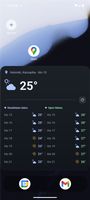
Paged home screen with free icon placement and smooth drag-and-drop — move icons within a page, across pages, and between the home grid and the dock. Drag an app from the drawer straight onto any page.
Dock of favorite apps (reorder, drag in/out).
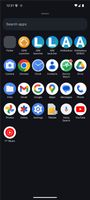
App drawer with universal search — one search box finds:
installed apps,
common system settings pages (type "wifi", "battery", …),
contacts (opt-in; gated by a setting + the READ_CONTACTS permission),
a calculator / unit converter (type 12*7 or 100 cm to in).
plus an optional most-used apps row.
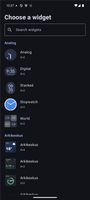
Home-screen widgets — browse large previews, tap Add or drag a preview onto the home screen. Long-press and continue dragging to move a widget; hold at a screen edge to change pages. Resize handles show the footprint and respect the widget's size limits; compatible widgets can stretch to full width or be reconfigured. Collection widgets (e.g. chat lists) scroll in place. Built-in clock (with the next event, alarm and optional weather), battery and notification widgets adapt to their size and offer translucent or themed backgrounds in Home screen settings.
Folders on the home screen and inside the drawer.
Notification dots / badges (via a notification-listener service; dot or Nova-style count).
People widget: messages, missed calls and mail grouped by person as tiles, with optional batch delivery that holds others' messages in the launcher's widgets, badges and status bar until set times. Android notifications, sounds and pop-ups remain active; new messages from pinned people, missed calls and recognized one-time codes bypass the batch.
Page menu: add a page to the left or right, set the home page, remove an empty page.
Material You themed icons (monochrome, on supported Android versions) and third-party icon packs.
Optional themed status bar with the clock, status indicators and notification icons.
Configurable gestures: swipe up → app drawer, swipe down → notifications, and a configurable left-edge swipe that launches an app of your choice.
Customizable look — adjustable app-label text size and colour, one- or two-line labels (per surface), dock opacity, grid columns, page indicator, and more.
Backup & restore — export/import your layout and settings to a file (widgets included).
Double-tap to lock — double-tap empty home-screen space to lock the screen (opt-in; uses a minimal accessibility service that reads nothing).
Lock desktop — a toggle that prevents accidental moving, removing, or adding of items.
Pixel-style long-press menus with app shortcuts and actions, plus an empty-area menu (home settings / wallpaper), all in one consistent visual style.
Hide apps from the drawer, rename apps with custom labels, and a self-contained settings screen.








 EU

 Emin added ARK-launcher as alternative to Kvaesitso, Lawnchair, Stario, KISS Launcher and 48 more

 jrs8205


No comments or reviews, maybe you want to be first?