
Archyv icon
Archyv icon

Archyv

Archyv is a native macOS app for managing large photo and media collections in bulk. It runs twelve focused processes over a folder you choose: batch renaming from each file's own metadata, manual pattern renaming, image conversion to six formats, duplicate and...
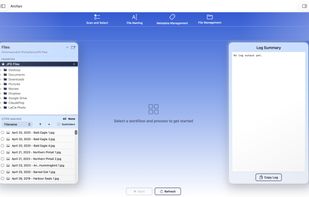
The Archyv main window. A folder of 749 photos is loaded from an external drive, with the four workflow tabs across the top — Scan and Select, File Naming, Metadata Management, File Management. The file list on the left shows photos already renamed to a date-and-subject convention; the Log Summary panel on the right reports what each run changed.

Cost / License

  • Pay once
  • Proprietary

Platforms

  • Mac  Requires macOS 14 (Sonoma) or later. AVIF and JPEG XL output require macOS 15 or later.
2likes
0comments
0articles

Features

Properties

  1.  Privacy focused

Features

  1.  File Tagging
  2.  Live Preview
  3.  No Tracking
  4.  Dark Mode
  5.  Batch Rename Files
  6.  No registration required
  7.  Built-in viewer
  8.  Ad-free
  9.  Works Offline
  10.  Offline
  11.  Support RAW file formats
  12.  Image Conversion
  13.  Metadata Editor
  14.  Duplicate File Finder

Archyv News & Activities

Highlights All activities

Recent activities

Archyv information

  • Developed by

    CA flagArchyvist
  • Licensing

    Proprietary and Commercial product.
  • Pricing

    One time purchase (perpetual license) that costs $99.
  • Alternatives

    7 alternatives listed
  • Supported Languages

    • English
Archyv was added to AlternativeTo by archyv on and this page was last updated .
No comments or reviews, maybe you want to be first?

What is Archyv?

Archyv is a native macOS app for managing large photo and media collections in bulk. It runs twelve focused processes over a folder you choose: batch renaming from each file's own metadata, manual pattern renaming, image conversion to six formats, duplicate and near-duplicate detection, a full IPTC/EXIF/XMP metadata editor, photographer and copyright attribution, a read-only metadata inspector, species tagging with Darwin Core taxonomy, folder generation, templated file transfer with checksum verification, sequence renumbering, and metadata-based selection filters.

It reads 40 file formats across 44 extensions — standard image formats, RAW from the major camera makers, and video — and writes metadata to 32 of them, using a bundled copy of ExifTool.

Everything runs on your own machine. There is no account and no cloud processing; your photos never leave your Mac. Changes made in place are recorded in a change history and can be undone for a retention period you set, removed duplicates go to the Trash, and conversions write new files rather than altering the originals. A Simulation Mode performs a full run without changing anything so you can read the result first.

macOS 14 or later. One-time purchase, not a subscription, with a 14-day free trial.
