AppGrid for KDE
9 likes
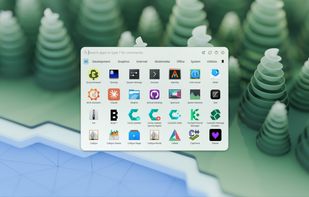
A modern application launcher for KDE Plasma, inspired by macOS Launchpad, COSMIC, and Pantheon.
Features
Properties
- Privacy focused
- Customizable
Features
- Works Offline
- Dark Mode
- Support for Multiple Monitors
- No registration required
- Ad-free
- No Tracking
- Favorites
- Application Launchers
- Integrated Search
- Support for Keyboard Shortcuts
- Categories
- Launcher
KDE Plasma integration
- Wayland Support
AppGrid for KDE News & Activities
Highlights All activities
Recent News
- POX published news article about AppGrid for KDE
AppGrid 1.9 adds compact mode, smarter search, UI updates, inline autocompletion, and moreAppGrid 1.9 has been released as the latest major version of this modern and blazing-fast applicati...
Recent activities
- boredwolf liked AppGrid for KDE
Danilo_Venom added AppGrid for KDE as alternative to Keboard
cepholotech added AppGrid for KDE as alternative to Deskmat
AppGrid for KDE information
No comments or reviews, maybe you want to be first?
Featured in Lists
Here are all the software I use on my Linux laptop. For the rest, I just use the default apps shipped with KDE Plasma …
List by Paul with 18 apps, updated
What is AppGrid for KDE?
A modern application launcher for KDE Plasma, inspired by macOS Launchpad, COSMIC, and Pantheon.
AppGrid ships as two plasmoids that share a common codebase:
- AppGrid — a standalone window launcher with its own blur, opacity, and corner radius settings.
- AppGrid (Panel) — a native Plasma panel popup that opens anchored to the panel icon, just like Kickoff. For those who prefer the traditional style.
Both variants share the same app grid, search, categories, quick commands, and configuration — pick whichever fits your workflow. Requires version 1.2+.
Features:
- Two plasmoid variants — standalone centered popup or native Plasma panel popup (like Kickoff)
- Unified search — app results and KRunner results merged into one list with Alt+1–9 shortcuts
- Favorites — add, remove, and reorder favorites with edit mode
- Categories — scrollable bar with Alt+key mnemonics, or use KDE Menu Editor categories
- Application actions — right-click any app to see jumplist actions (e.g., New Private Window)
- Quick commands — terminal (t:), shell commands (:), file browser (/), system info (i:), hidden apps manager (h:), help (?)
- Keyword search — matches desktop file keywords (e.g., typing "browser" finds Firefox)
- Search ranking — results ranked by match quality (name prefix > substring > generic name > keyword)
- Multi-category — apps appear in all matching categories, not just the first
- By Category sort — groups apps by category with section headers and scrollable navigation
- Open/close animations — Fade, Scale, Pop, Slide Up/Down, Glide, Buzz, Twist, Slam, or None
- Icon animations — shake, grow, bounce, spin, shuffle, or none
- Multi-monitor — open on active screen or panel screen
- Customizable — grid size, icon size, blur, opacity, corner radius, dividers, session buttons
- Respects KDE settings — system animation speed, font size, Plasma theme corner radius
- Dim background — optional darkened overlay behind the launcher for focus
- Sort by most used, alphabetically, or by category; new app detection with badge
- Context menu with favorites, pin to Task Manager, add to Desktop, hide apps
- Session management (sleep, restart, shut down, lock, log out, switch user)
- Drop-in replacement via Plasma's Show Alternatives