Historical Resource Monitoring
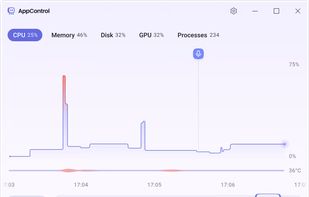
AppControl is a historical Task Manager for Windows PCs that lets you scroll back through days of detailed system activity. See exactly what spiked your CPU, used up RAM, or maxed out your GPU over long time periods. AppControl also shows you which apps accessed your webcam, microphone, location, and much more — including hidden app installs you might have missed.
CPU & GPU Temperature History
Are you worried your PC is running a bit hot? AppControl keeps track of your PC's CPU/GPU temperature historically. If you find your PC is overheating you can go back in time and see what app was using the most hardware resources at the time.
Enforce Real Control Over Your Apps
Do much more than just "End Task". AppControl lets you permanently disable problem apps, block entire app publishers with a click, and build custom rules to stay in control.
Custom Alerts
New App? Hold On.
AppControl gives you real-time alerts when new or unusual apps start running.
AppControl temporary desktop alert revealing that an unsigned application began accessing the user PC microphone
Privacy Access Alerts
You’ll get alerts when apps access your webcam, mic, or location, with options to block or investigate.
How Loud Should I Be?
Choose whether alerts stay inside the app or show up briefly on your desktop.
What’s That App? AppControl Knows.
AppControl tells you what every app, process, and executable is with plain-language descriptions. You can skip the web search because AppControl gives you the answer right in the app.
Built for Privacy
Unfortunately, some apps today don’t respect your privacy. They check your location, run hidden background tasks, and use your system resources for their own purposes. AppControl reveals these hidden behaviors and gives you control to stop them.
Why is AppControl Free?
We built AppControl as a tool we wanted for ourselves to protect our resource usage, security, and privacy. If others enjoy AppControl we plan to offer optional premium features someday in the future.
About AppControl
Led by Jon Hundley, the AppControl team got tired of using Windows Task Manager, so they built a powered up version with history, more powerful controls, event monitoring, and alerts. Chat with the AppControl team on the AppControl Discord, the AppControl Forum, or email them!







 c17s5qhu added AppControl for Windows as alternative to ServerBox
 Danilo Venom added AppControl for Windows as alternative to ACTVT

 Jon Hundley


Comments and Reviews
Some good ideas in this task manager : resources usage history, sorting processes by publisher's certificate or unsigned. It shows which program uses microphone or webcam. A popup alerts the user when a new unsigned process is executed or accesses the camera. Alerts can be triggered by other events (microphone access, new app launch ... ).