AnyTask icon
AnyTask icon

AnyTask

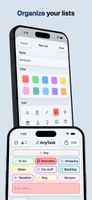
Create and sort tasks using colors, icons, subtasks, and photos. Set reminders, use recurring schedules, and sync with iCloud across iPhone, iPad, and Mac. Share any list in real time via iCloud, collaborate without accounts, and access Calendar view or widgets.

AnyTask screenshot 1

Cost / License

  • Freemium (Subscription)
  • Proprietary

Platforms

  • iPhone
  • iPad
2likes
0comments
0articles

Features

Properties

  1.  Lightweight
  2.  Distraction-free
  3.  Support for Themes

Features

  1.  Cloud Sync
  2.  Real time collaboration
  3.  Recurring Tasks
  4.  No registration required
  5.  Calendar View
  6.  Calendar Integration
  7.  Reminders
  8.  Full-Text Search
  9.  No Tracking
  10.  Works Offline
  11.  Dark Mode
  12.  Subtasks
  13.  Ad-free
  14.  Organization

AnyTask News & Activities

Highlights All activities

Recent activities

AnyTask information

  • Developed by

    US flagKyle Hosman
  • Licensing

    Proprietary and Freemium product.
  • Pricing

    Subscription that costs $2 per month + free version with limited functionality.
  • Alternatives

    8 alternatives listed
  • Supported Languages

    • English
    • Chinese
    • Dutch
    • French
    • German
    • Italian
    • Japanese
    • Korean
    • Portuguese
    • Spanish
AnyTask was added to AlternativeTo by Kyyyle on and this page was last updated .
No comments or reviews, maybe you want to be first?

What is AnyTask?

AnyTask is a task management software that organizes tasks into customizable lists. Users can add subtasks, set due dates, and attach photos and links. The interface allows for quick sorting and moving of tasks, useful for weekly planning or clearing backlogs. The software includes a sharing feature for task lists via iCloud, synchronizing changes in real time. It also has a scheduling feature that sends reminders and allows for recurring tasks. Tasks can be viewed in Calendar view and synced with Apple Calendar. The software is compatible with iPhone, iPad, and Mac, and features home screen widgets, Siri and Apple Shortcuts for hands-free management, and import ability from Apple Notes.

Official Links