Alternate Commander icon

Alternate Commander

 Like

Free, open-source two-panel file manager in the style of Total Commander, with archives as folders, Google Drive, Dropbox, Synology NAS and SSH/SFTP.
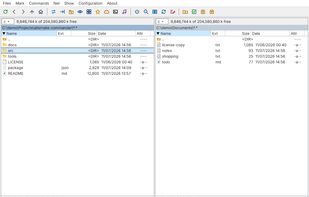
Two panels with a folder tree and file lists

Cost / License

  • Free
  • Open Source (MIT)

Since

  • New

Updated

  • Updated Nov 2026

Platforms

  • Windows
  • Mac  Not notarized by Apple: install with the one-line command from the website or with Homebrew
  • Linux
0likes
0articles
Save

Features

Features

Highlights All activities

Alternate Commander News & Activities

Recent activities

Alternate Commander information

AlternativeTo Category

File Management

GitHub repository

  •  1 Stars
  •  0 Forks
  •  0 Open Issues
  •   Updated  
View on GitHub
Alternate Commander was added to AlternativeTo by powervac on and this page was last updated .

No comments or reviews, maybe you want to be first?

Official Links

What is Alternate Commander?

Alternate Commander is a free, open-source (MIT) two-panel file manager for Windows, macOS and Linux, inspired by Total Commander. It is built for the keyboard: F3 view, F4 edit, F5 copy, F6 move, F7 new folder, F8 delete, tabs, a directory hotlist and a quick view panel.

Archives (zip, 7z, tar, tar.gz, rar and more) open like folders and can be packed and unpacked; large files can be split and combined. Google Drive, Dropbox, Synology NAS (also through QuickConnect) and SSH/SFTP servers (with a real terminal console) work as ordinary disks, with one-button sign-in for the clouds. Other tools: Find Files (names, regular expressions, text inside files and archives), compare and synchronize folders, multi-rename, a viewer for text, hex, images, PDF, video, audio and Office documents, an editor, a music player, thumbnails, a job queue and settings sync through Dropbox, Google Drive or a folder. The interface is available in eight languages.

It is an unofficial project and is not affiliated with Total Commander / Ghisler Software.