


Adobe Elements
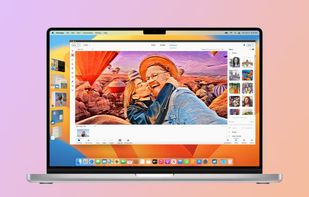
Comprehensive photo editing tool with AI-powered automation and easy step-by-step guidance. It includes unique creation tools, layer support, facial recognition, and organizes your photos seamlessly. Available as a one-time purchase, no subscription required, with cloud sync for flexibility.

Cost / License
- Pay once
- Proprietary
Application typeApplication types
Platforms
- Mac
- Windows
- Online
- Android
- iPhone


Features
Adobe Elements News & Activities
Recent News
- Mauricio B. Holguin published news article about Adobe Elements

Recent activities
 Dennis-5303 added Adobe Elements as alternative to Scumble
I bought Photoshop Elements 6.0 sometime ago. It's just better than the newer versions. For some reason 6 was closer to the normal Photoshop. I have tried the newer versions and I used the heavyweight Photoshop full version at work extensively. Elements 6.0 does everything you need it to do. It's like using LibreOffice instead of Word. Most of the heavyweight features a home user isn't going to go near. I also find that if you need an effect on an image, a regular Photoshop tutorial can be...
 Serious Goose added Adobe Elements as alternative to PhotoSuite
 Andreas Express added Adobe Elements as alternative to Luna Crop
 DESANOA added Adobe Elements as alternative to Poprica
 Paul added Adobe Elements as alternative to PhotoFlare Studio
 Paul added Adobe Elements as alternative to ItsPaint
 getapps added Adobe Elements as alternative to DesignBrew
- Clipping Path India A comment was removed from Adobe Elements
- A comment was removed from Adobe Elements


Featured in Lists


Core, Development & Services


Photo Editor


The Arts




What is Adobe Elements?
Adobe Elements information
Developed by
 Adobe
Adobe Licensing
Proprietary and Commercial product.Pricing
One time purchase (perpetual license) ranging between $100 and $150.Alternatives
164 alternatives listedBadge
Get an embeddable badge for Adobe ElementsSupported Languages


Comments and Reviews
I bought Photoshop Elements 6.0 sometime ago. It's just better than the newer versions. For some reason 6 was closer to the normal Photoshop. I have tried the newer versions and I used the heavyweight Photoshop full version at work extensively. Elements 6.0 does everything you need it to do. It's like using LibreOffice instead of Word. Most of the heavyweight features a home user isn't going to go near. I also find that if you need an effect on an image, a regular Photoshop tutorial can be applied to Elements to get the result you need. For editing pictures, brightening, sharpening etc, Elements had one click options, saves a lot of messing about. Of course, you could download Gimp instead and then get really confused.
Adobe Photoshop (Elements) is a graphics editor for photographers, image editors, and hobbyists. It contains most of the features of the professional version but with fewer and simpler options. The program allows users to create, edit, organize, and share images. Adobe Photoshop Elements is an excellent option for photo hobbyists who don't want to pay a subscription. You get many of Photoshop's best features with more ease of use. Our Editing team also uses this.