

123ToDo
Like
Fast, private, and free PWA task manager & voice notes with zero-knowledge AES-256 encrypted Google Drive & Cloudflare sync.
Features
Properties
- Privacy focused
- Lightweight
Features
- Encrypted Backup
- End-to-End Encryption
- No Tracking
- Works Offline
- Calendar Integration
- Kanban Board
- Cloud Sync
- Full-Text Search
- Goal Tracking
- Reminders
- Dark Mode
- No registration required
- Ad-free
- Subtasks
- Recurring Tasks
- Automatic Backup
123ToDo News & Activities
Highlights All activities
Recent activities
123ToDo information
No comments or reviews, maybe you want to be first?
What is 123ToDo?
A fast, free, private Progressive Web App (PWA) for tasks, projects, and voice notes.
Highlights & Key Advantages
- 100% Free & Uncapped: Priority matrix (P1–P4), recurring tasks, subtasks, unlimited projects, and unlimited notes without subscription paywalls.
- Productivity & Achievements Hub: Top header trophy badge opening an interactive house-styled modal with 10-tier level progression, Productivity Points, 6-card productivity insights, daily streaks, 1-2-3 rule balance ratios, unlockable milestone badges, and official 123todo.com blog guides.
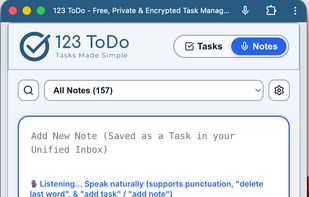
- Dual-Skin OS: Instant 1-tap toggle between structured Task Manager Mode and distraction-free Simple Voice Notes Mode.
- Interactive Drag-and-Drop Subtasks: Multi-line auto-wrapping checklist subtasks with draggable reordering across Add Task, Edit Task, and Task lists.
- Compact Note Previews: Space-efficient single-line note preview under task titles for effortless scanning without clutter.
- Zero-Knowledge Encrypted Sync: Client-side AES-256-GCM encryption syncing directly via personal Google Drive or Cloudflare D1 with shared cross-platform stats.
- Universal Competitor Migration: 1-click import wizard for Todoist, TickTick, Google Keep, Google Tasks, and Microsoft To Do.
- Continuous Voice Dictation: Web Speech API integration with spoken punctuation recognition ("comma", "full stop", "question mark") and auto-submission commands.
- Wide Mode Kanban Views: View desktop tasks grouped either by Priorities (P1–P4) or Project Columns with drag-and-drop.
- Offline First: Works anywhere with automatic 24-hour local shadow backups and persistent storage protection.


