





#Pad
5 likes
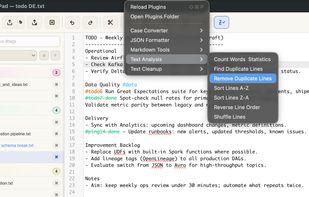
Desktop notepad for Windows and macOS with #tag-based note organization, built-in TODOs, reminders, regex search, professional editor, clipboard and operation history, plugin support, file versioning, large file handling, and a free 14-day trial.

Cost / License
- Pay once
- Proprietary
Application type
 EU
EUPlatforms
- Mac
- Windows


Features
Highlights All activities
#Pad News & Activities
Recent News
No news, maybe you know any news worth sharing?
Share a News Tip
Recent activities
 James Cupps added #Pad as alternative to Slate Text Editor
- stevexu added #Pad as alternative to notePad++++
 Koner added #Pad as alternative to Iskra Text Editor
- miau liked #Pad
- brokesimp69 liked #Pad
- Benjamin Brooks liked #Pad
- Vesanerie liked #Pad
- Doungyup Han liked #Pad




Developed by
 Arkadiusz Jachnik
 Licensing
Proprietary and Commercial product.Pricing
One time purchase (perpetual license) that costs $10.Alternatives
18 alternatives listedBadge
Get an embeddable badge for #PadSupported Languages


No comments or reviews, maybe you want to be first?