


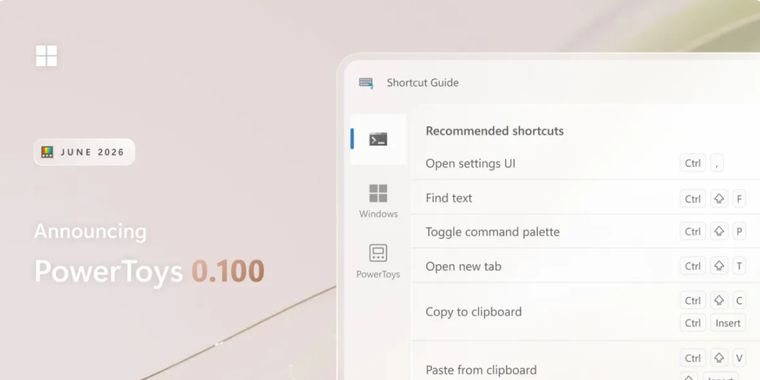

PowerToys 0.100 (not 1.0) launches with redesigned Shortcut Guide and Extension Gallery
PowerToys has announced its latest update, and while it may not be the long-awaited 1.0 milestone, version 0.100 still lands with a packed release. The update is led by a fully rebuilt Shortcut Guide, which now appears as a side pane and automatically detects the active app to show relevant shortcuts, including Windows shortcuts, app-specific commands, and enabled PowerToys utilities.
Command Palette also gets a major update with a new Extension Gallery for browsing, installing, updating, and removing extensions directly from PowerToys. Its Dock now supports multi-monitor setups, allowing different docks and pinned commands per display. Performance Monitor adds a Battery widget with charge level, charging status, and estimated time remaining, while individual metrics like CPU, Memory, GPU, Network, and Battery can now be pinned to the Dock.
Power Display focuses on reliability, with faster startup, more stable monitor detection across restarts and sleep, and a new Max Compatibility Mode for displays with limited DDC support. ZoomIt adds webcam overlays for recordings and support for appending clips with transitions. Under the hood, PowerToys moves to .NET 10, reduces installer size by 15%, improves auto-update reliability, and backs up configuration files before updates to help protect user settings.





- Application Launcher
- Free
- Open Source
Other apps mentioned in this article


Related news
External links
- PowerToys 0.100 is here: new Shortcut Guide, Command Palette improvements and much more!Windows Command Line • Official source
No comments so far, maybe you want to be first?