• Alfred icon
  • PopClip icon
  • aText icon
  • BetterTouchTool icon
  • Spectacle Wndow Manager icon
  • +5

10 must-have macOS apps for power users

PaulPaul10 appsUpdated
Copy a direct link to this comment to your clipboard

Many users just love macOS for a few apps you can't find anywhere else. Today, I am delivering a list of apps that I think are indispensable and really useful for any macOS user.

  1. Alfred icon
     Like

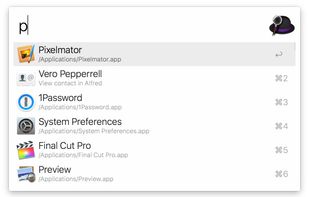
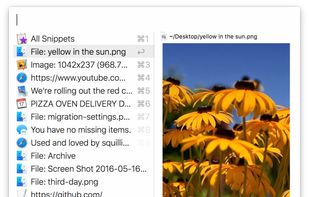
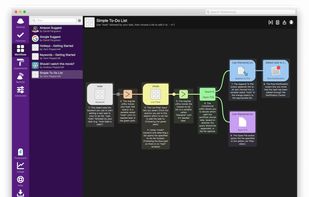
    Alfred is a productivity application for macOS, which boosts your efficiency with hotkeys, keywords and text expansion. Search your Mac and the web, and control your Mac using custom actions with the Powerpack.

    Cost / License

    • Freemium
    • Proprietary

    Application type

    Platforms

    • Mac
    • iPhone
    • iPad
    Alfred screenshot 1
    Alfred screenshot 1
    Alfred screenshot 2
    +1
    Alfred screenshot 3
    PaulPaul’s note

    Alfred is Spotlight icon Spotlight on steroids. A must-have because of its functionality and speed. You can of course search your files, but also search the internet, check iTunes, do calculations, and much more.

  2. PopClip icon
     Like

    Appears on text selection in Mac apps, providing quick actions like copy, paste, spelling correction, web search, dictionary lookup, and over 50 extensions.

    Cost / License

    • Paid
    • Proprietary

    Platforms

    • Mac
    • Setapp
    PopClip screenshot 1
    PopClip screenshot 1
    PopClip screenshot 2
    +2
    PopClip screenshot 3
    PaulPaul’s note

    Popclip is a handy little application that displays a small context menu when you select text or simply click in a text box, like on iOS, offering options such as copy, paste, bold or italic text, Google search, or many other useful things (159 extensions are available).

  3. aText icon
     Like

    aText accelerates your typing by replacing abbreviations with frequently used phrases you define.

    Cost / License

    • Paid
    • Proprietary

    Application type

    Platforms

    • Mac
    • Windows
    • Parallels Desktop
    aText screenshot 1
    Basic Snippet
    Advanced variables
    +6
    Sync Preferences
    PaulPaul’s note

    aText is an utility that quickly becomes indispensable when you start using it. It's an abbreviation manager that saves time when typing text. Its possibilities are almost infinite, but let's start with a simple example: to write "Thank you", we can only use the two letters ty and the software will replace them with the complete word automatically.

  4. Customizes Mac input devices with gesture, shortcut, and button mapping, window management, automation, multi-device support, and iOS app integration.

    Cost / License

    • Paid
    • Proprietary

    Application type

    Platforms

    • Mac
    BetterTouchTool screenshot 1
    BetterTouchTool screenshot 1
    BetterTouchTool screenshot 2
    +1
    BetterTouchTool screenshot 3
    PaulPaul’s note

    Those who use macOS on a daily basis and in any way, shape, or form can only appreciate the gesture controls. Whether they are performed with the mouse with a Magic Mouse or with a trackpad, gestures simplify life as soon as you master them. For those who want to go even further and add other mouse-keyboard gestures or combinations, BetterTouchTool is the tool you need.

  5. No longer updated Mac utility to view documents side-by-side and move them between displays.

    Cost / License

    • Free
    • Open Source

    Application type

    Platforms

    • Mac
    Spectacle Wndow Manager screenshot 1
    Spectacle Wndow Manager screenshot 1
    Spectacle Wndow Manager screenshot 2
    +2
    Spectacle Wndow Manager screenshot 3
    PaulPaul’s note

    Spectacle is an open source window management app that moves and resizes windows with ease. Unlike with Windows, you can’t merely drag and snap windows to various regions; Spectacle runs via hotkeys. You can change any of these key combinations by going into preferences and setting each to your liking. There is even a guide at the bottom of the window to help decipher each shortcut symbol in case of confusion. And if you happen to mess up, there’s always the option to reset.

  6. Hazel icon
     Like

    Automates file organization by monitoring specific folders, sorting, renaming, moving files with custom rules, managing trash, and removing leftover app files.

    Cost / License

    • Paid
    • Proprietary

    Application type

    Platforms

    • Mac
    Hazel screenshot 1
    Hazel screenshot 1
    Hazel screenshot 2
    +1
    Hazel screenshot 3
    PaulPaul’s note

    Hazel is your personal housekeeper, organizing and cleaning folders based on rules you define. Hazel can also manage your trash and uninstall your applications.

  7. Clipy icon
     Like

    Clipy is a clipboard extension for macOS.

    Cost / License

    • Free
    • Open Source

    Application type

    Platforms

    • Mac
    Clipy screenshot 1
    Clipy screenshot 1
    PaulPaul’s note

    Clipy is a macOS clipboard extension. A clipboard may not sound like the most useful feature, since it just temporarily stores whatever you copy. But if you frequently copy and paste things, you would come to know the importance of a clipboard extension. Clipy helps your Mac remember earlier pasteboard entries when you have to copy multiple items consecutively.

  8. DaisyDisk icon
     Like

    Visually analyzes disk space with an interactive sunburst map, identifies and previews large files, and enables efficient removal to reclaim storage space.

    Cost / License

    • Paid
    • Proprietary

    Application type

    Platforms

    • Mac
    DaisyDisk 4 showing HD level scan, including free space on the disk. Hidden volumes are revealed in DaisyDisk that you normally can't see in Apple's utilities.
    Dynamic functions like preview or show in finder make it easy to distinguish files.
    DaisyDisk screenshot 2
    +2
    DaisyDisk screenshot 3
    PaulPaul’s note

    DaisyDisk is an application that allows you to visually see what takes up a lot of space on your hard disk, and delete files that you have forgotten and that take up space. The interface is very beautiful and functional. A pleasure to use!

  9. Automate applications or web sites, text or images, simple or complex, on command or scheduled. You can automate virtually anything.

    Cost / License

    • Paid
    • Proprietary

    Application type

    Platforms

    • Mac
    Keyboard Maestro screenshot 1
    PaulPaul’s note

    Keyboard Maestro is the hot-key solution that allows you to perform a multitude of tasks simply by pressing a keystroke! It also incorporates the wildly popular macOS Classic utility Program Switcher, which allows you to launch, switch, and quit applications with a simple keystroke.

  10. System monitor for Mac tracking CPU, GPU, network, sensors, disks, memory, and weather with menubar stats, notifications, privacy options, and custom views.

    Cost / License

    • Paid
    • Proprietary

    Platforms

    • Mac
    • iPhone
    iStat Menus screenshot 1
    iStat Menus screenshot 1
    iStat Menus screenshot 2
    +1
    iStat Menus screenshot 3
    PaulPaul’s note

    Let's face it, iStat Menus isn't necessarily the most useful utility, but for anyone who likes to keep an eye on their Mac to make sure everything is working, it's a must. Thanks to it, one can have in the menu bar all the essential parameters of the computer, whether it is concerning the processor, the RAM or the hard disks and the battery.


This is a non-exhaustive list, as I can't speak about all the numerous little apps that I like (https://alternativeto.net/software/appcleaner/, https://alternativeto.net/software/imageoptim/, https://alternativeto.net/software/iterm2/, https://alternativeto.net/software/transmission/, https://alternativeto.net/software/the-unarchiver/…). If you have any question or feel a software is missing from this list, feel free to comment this list or to hit me up on Twitter. 🙂

No comments so far, maybe you want to be first?