
Best Open-Source AI Projects (2026)

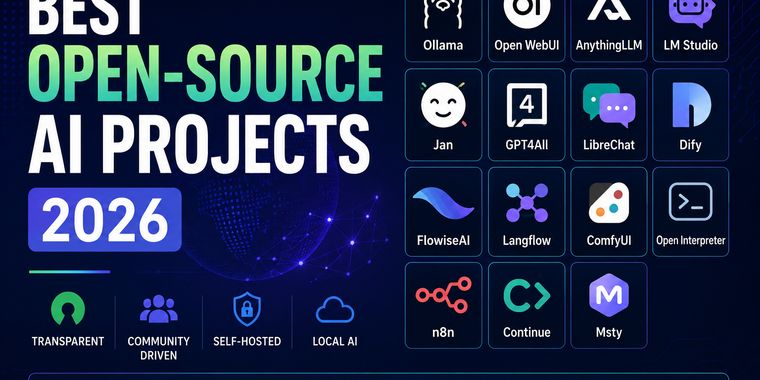
Open-source AI is evolving at an incredible pace, giving developers and enthusiasts more freedom, transparency, and control than ever before. This collection highlights some of the most interesting open-source AI projects for running models locally, building AI applications, automating workflows, and experimenting with the latest advances in artificial intelligence. Whether you're looking for privacy, customization, or simply want to avoid vendor lock-in, these projects are well worth exploring.

Viktor Korobov
Viktor KorobovList by Viktor Korobov, last updated 
Copy a direct link to this comment to your clipboard
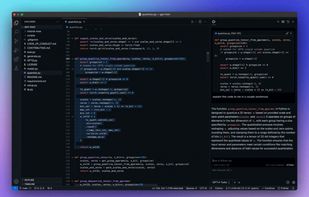
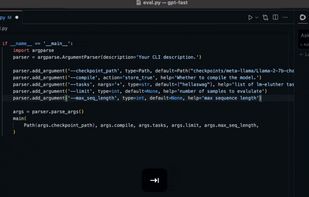
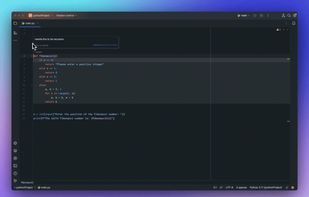
  1. If you spend a lot of time writing code, Continue is worth trying. I like that it works with different AI models instead of locking you into a single ecosystem.

    Cost / License

    • Free
    • Open Source

    Application type

    Platforms

    • Mac
    • Windows
    • Linux
    • IntelliJ IDEA
    • Visual Studio Code
    Continue.dev screenshot 1
    Continue.dev screenshot 1
    Continue.dev screenshot 2
    +1
    Continue.dev screenshot 3
  2. AI-native markdown editor featuring WYSIWYG editing, LLM integrations, team sharing, GitHub sync, graph wiki links, TUI, and embeddable components.

    Cost / License

    • Free
    • Open Source

    Platforms

    • Mac
    • Windows
    • Linux
    • Node.JS
    OpenKnowledge screenshot 1
  3. n8n icon
     Like

    One of my favorite automation platforms. Whether you're connecting apps or building AI workflows, n8n gives you a huge amount of flexibility without forcing you into a cloud service.

    Cost / License

    • Freemium
    • Proprietary

    Platforms

    • Online
    • Self-Hosted
    • Software as a Service (SaaS)
    • Cloudron
    n8n screenshot 1
    n8n screenshot 1
    n8n screenshot 2
    +2
    n8n screenshot 3
  4. This feels like giving an AI assistant real hands instead of just a keyboard. It's incredibly powerful, but it's also one of those tools that should be used thoughtfully.

    Cost / License

    • Free
    • Open Source

    Platforms

    • Windows
    • Linux
    Open interpreter screenshot 1
  5. Comfy icon
     Like

    ComfyUI definitely has a learning curve, but once it clicks, it's hard to go back. The amount of control you get over image generation is simply amazing.

    Cost / License

    • Free Personal
    • Open Source

    Platforms

    • Mac
    • Windows
    • Linux
    • Online
    Comfy screenshot 1
    Comfy screenshot 1
    Comfy screenshot 2
    +2
    Comfy screenshot 3
  6. LangFlow icon
     Like

    I like Langflow because it lets you see how everything connects instead of hiding the logic in code. It's a great way to prototype and learn at the same time.

    Cost / License

    • Free
    • Open Source

    Platforms

    • Self-Hosted
    LangFlow screenshot 1
    LangFlow screenshot 1
  7. Flowise icon
     Like

    Flowise is one of those tools that makes complex AI workflows much easier to understand. Even if you're new to LangChain, the visual interface helps a lot.

    Cost / License

    • Free
    • Open Source

    Platforms

    • Self-Hosted
    Basic example of LLM Chain with a Prompt Template and LLM Model
    Github repo QnA using conversational retrieval QA chain
    Language translation using LLM Chain with a Chat Prompt Template and Chat Model
  8. LibreChat icon
     Like

    If you enjoy experimenting with different AI models, LibreChat is hard to beat. Being able to connect multiple providers and even local models in one interface is incredibly convenient.

    Cost / License

    • Free
    • Open Source

    Platforms

    • Self-Hosted
    • Docker
    • Cloudron
    • npm
    LibreChat screenshot 1
    LibreChat screenshot 1
    LibreChat screenshot 2
  9. GPT4ALL icon
     Like

    GPT4All was one of the first projects that made local AI accessible to everyone. It may not have every new feature, but it's still a solid option if you want an offline AI assistant.

    Cost / License

    • Paid
    • Open Source

    Platforms

    • Mac
    • Windows
    • Linux
    • Flathub
    GPT4ALL screenshot 1
    GPT4ALL screenshot 1
    GPT4ALL screenshot 2
  10. Jan.ai icon
     Like

    I like Jan because it feels clean and simple without sacrificing flexibility. It's a nice choice if you want a ChatGPT-like experience while keeping control over where your AI runs.

    Cost / License

    • Free
    • Open Source

    Platforms

    • Mac
    • Windows
    • Linux
    • Online
    • Flathub
    • Flatpak
    Jan.ai screenshot 1
    Jan.ai screenshot 1
    Jan.ai screenshot 2
    +3
    Jan.ai screenshot 3
  11. LM Studio icon
     Like

    Probably the easiest way to get started with local AI. Download a model, click a few buttons, and you're chatting with it in minutes. Great for anyone who wants to keep everything on their own computer.

    Cost / License

    • Free
    • Proprietary

    Platforms

    • Mac
    • Windows
    • Linux
    LM Studio screenshot 1
  12. I've tried quite a few AI workspaces, and AnythingLLM is one of the easiest ways to chat with your own documents. If you want a private knowledge base without being locked into one AI provider, it's definitely worth a look.

    Cost / License

    • Free
    • Open Source

    Platforms

    • Mac
    • Windows
    • Linux
    • Self-Hosted
    • Docker
    AnythingLLM screenshot 1
    AnythingLLM screenshot 1
    AnythingLLM screenshot 2
  13. Ollama icon
     Like

    Ollama makes it easy to run large language models locally on your own computer with just a few commands. It supports many popular open-source models, offers a simple setup process, and gives users full control over their AI without relying on cloud services, making it a popular choice for developers, researchers, and privacy-conscious users.

    Cost / License

    • Free
    • Open Source

    Platforms

    • Mac
    • Windows
    • Linux
    Ollama screenshot 1
    Ollama screenshot 1
  14. Extensible offline AI platform with user-friendly interface, LLM runner support, RAG inference, privacy focus, no registration, text-to-image, cloud sync, and dark mode.

    Cost / License

    • Free
    • Open Source

    Platforms

    • Online
    • Self-Hosted
    • Cloudron
    • Docker
    Open WebUI screenshot 1
    Connect multiple OpenAI compatible APIs or Ollama instances
    Manage models on your Ollama instances — with update functionality!
    +9
    Download models directly from the Chat for Ollama

The open-source AI ecosystem is growing faster than ever. Every month brings new models, agent frameworks, local AI tools, and developer platforms that rival commercial solutions. This list brings together the projects I find most useful, innovative, and actively maintained—whether you're building AI applications, running models locally, experimenting with agents, or simply looking for powerful alternatives to proprietary AI software.

No comments so far, maybe you want to be first?
Gu