• WordPress icon
  • Ghost icon
  • Write.as icon
  • Telescope icon
  • Bear Blog icon
  • +3

Start a blog without writing a single line of code

PaulPaul8 appsUpdated
Copy a direct link to this comment to your clipboard

Maybe you want to create your own little place on the Internet. But maybe you don't want to code and don't know where to start. If so, then this list might be right for you. 🚀

I'll show you some software that will help you start a blog easily and without having to write a single line of code. All you'll have to do is create an account on the platform of your choice and just start writing about your favorite topics.

  1. WordPress icon
     Like

    Open-source software for creating websites and blogs with an emphasis on accessibility, ease of use, performance, and security.

    Cost / License

    • Freemium
    • Open Source

    Application type

    Platforms

    • Mac
    • Windows
    • Linux
    • Online
    • Android
    • iPhone
    • Android Tablet
    • iPad
    • Self-Hosted
    • PHP
    • Cloudron
    • Google Chrome
    • Safari
    WordPress screenshot 1
    WordPress screenshot 1
    WordPress screenshot 2
    +1
    WordPress screenshot 3
    PaulPaul’s note

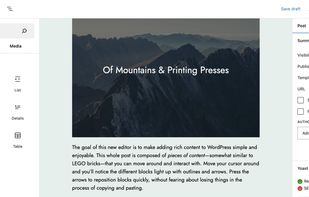
    It would be difficult to start an article about blogging without talking about the KING. WordPress has been around since 2003 (or 2001) and now powers almost 40% of the whole world wide web. It started as a blogging platform, but it's now much more than that; you can build nearly any website you want with it. There are two versions of WordPress: the self-hosted one at WordPress.org, and the hosted one at WordPress.com. And since we're talking about no-code tools here, I'll suggest you try the second one. Just create an account, choose a theme, mess around, and start writing!

  2. Ghost icon
     Like

    The world's most popular modern publishing platform for creating a new media platform.

    Cost / License

    • Freemium
    • Open Source

    Application type

    Platforms

    • Online
    • Self-Hosted
    • Cloudron
    • Node.JS
    Ghost screenshot 1
    Ghost screenshot 1
    Ghost screenshot 2
    +1
    Ghost screenshot 3
    PaulPaul’s note

    WordPress is great, but it might be a bit too much if all you want to do is write some blog posts. But don't worry, I've got a tool for you: its name is Ghost. It's a simple and feature rich open source blogging software designed for publishing with speed and ease. Its admin interface is clean and beautiful while also being sure to get out of your way so you can focus on writing your next masterpiece. And if Ghost is a bit too expensive for you, you can also take a look at Ghost hosting platforms such as Midnight icon Midnight.

  3. Write.as icon
     Like

    Write.as lets you write and publish text instantly. Write a note for yourself to read later. Create a standalone article you can quickly broadcast on social media — or publish a full blog.

    Cost / License

    • Paid
    • Proprietary

    Application type

    Platforms

    • Mac
    • Windows
    • Linux
    • Android
    • iPhone
    • Chrome OS
    • Android Tablet
    • iPad
    • Google Chrome
    • Kindle Fire
    Write.as screenshot 1
    Write.as screenshot 1
    Write.as screenshot 2
    +8
    Write.as screenshot 3
    PaulPaul’s note

    Write.as is a simple writing platform built on top of WriteFreely icon WriteFreely. It's a simple and distraction-free platform that supports Markdown. It's a great tool if you want to start a blog, journal, or newsletter. There's a free plan to get you started and two more feature-rich paid plans. Write.as is ad-free and open source.

  4. Telescope icon
     Like

    Telescope is a writing and publishing platform. It offers a beautiful and minimal text editor, it doesn't ask your personal details, it features a bunch of cool content distribution mechanisms, and fast and nice-looking content pages.

    Cost / License

    • Freemium
    • Proprietary

    Application type

    Platforms

    • Online
    Telescope screenshot 1
    Telescope screenshot 1
    Telescope screenshot 2
    +2
    Telescope screenshot 3
    PaulPaul’s note

    Telescope is a minimal, simple, and fast publishing platform with a focus on privacy. In their words, “It's like Medium icon Medium, but without all the bullshit.” They released version 2.0 in October 2020, and their editor now supports Markdown and customization of the CSS of your Telescope blog (as well as other features). The platform offers a generous free tier, and you can always subscribe to their Pro plan if it's not enough for you.

  5. Bear Blog icon
     Like

    Privacy-first, no-nonsense, super-fast blogging. No trackers, no JavaScript, no stylesheets. Just your words.

    Cost / License

    • Freemium
    • Proprietary

    Application type

    Platforms

    • Online
    Bear Blog screenshot 1
    PaulPaul’s note

    Bear Blog is a privacy-first, no-nonsense, super-fast blogging platform. There are no trackers, no JavaScript, and no stylesheets: just your words. If you're looking for something minimal and optimized to write your articles, then this might be the right tool for you. It's lightweight, fast, works on any device, and can even connect to your own domain name for free. In fact, Bear Blog is completely free (and open source).

  6. Social network for indie blogs.

    Cost / License

    • Freemium
    • Proprietary

    Application type

    Platforms

    • Mac
    • Online
    • Android
    • iPhone
    • iPad
    Micro.blog screenshot 1
    Micro.blog screenshot 1
    Micro.blog screenshot 2
    +5
    Micro.blog screenshot 3
    PaulPaul’s note

    More than a blogging platform, Micro.blog is a network of independent microblogs, with replies, conversations, and a timeline to follow friends while being backed by strong community guidelines. You can create your blog with your own custom domain name, and interact with others while your content is on your own blog that you control. Micro.blog offers a free tier, as well as several paid plans starting at $5 a month.

  7. Blot icon
     Like

    Blot is a blogging platform with no interface. It creates a special folder in your Dropbox and publishes files you put inside. The point of all this?—?the reason Blot exists?—?is so you can use your favorite tools to create whatever you publish.

    Cost / License

    • Paid
    • Open Source

    Application type

    Platforms

    • Online
    • Self-Hosted
    Blot screenshot 1
    Blot screenshot 1
    Blot screenshot 2
    +4
    Blot screenshot 3
    PaulPaul’s note

    Blot is a blogging platform with no interface. Yes, you read that right. It can seem odd, but it actually turns a local folder on your computer into a website. When you put files inside your blog’s folder, Blot turns them into blog posts. You can synchronize your blog’s folder to Blot using Dropbox icon Dropbox or Git icon Git. This way, you can use the tools you want to create whatever you publish. Blog doesn't offer a free plan and costs $4 per month per blog, but you might be able to self-host it for free in the future.

  8. Telegra.ph is an anonymous publishing platform by Telegram icon Telegram that lets anyone post stories without having to register an account. Simply visit the site and you'll be presented with a light form for posting.

    Cost / License

    • Free
    • Proprietary

    Application type

    Platforms

    • Online
    Telegra.ph screenshot 1
    PaulPaul’s note

    Telegra.ph is an anonymous publishing platform by Telegram icon Telegram that lets anyone post stories without having to register an account. Simply visit the site and you'll be presented with a light form for posting. Enter your article's content along with a title and your name and press Publish to get a public URL to access it. It's that simple. You can use Markdown to format your content and also embed images from your computer alongside tweets and videos from YouTube and Vimeo.


Each of the platforms I've mentioned provides you with the tools you need to create a great blog, but some of them may be better suited to your purposes than others. Feel free to let me know in the comments what's your tool of choice for building a personal blog. 🙂

Comments

NejyCR
1

Not many blogs I've come across use code at all - they're usually either WordPress or Blogger.