Apps tagged with 'Writing Goals'

All apps in Apps tagged with 'Writing Goals' category. Use the filters below to narrow down your search. 
Copy a direct link to this comment to your clipboard
  1. kindling icon
     6 likes

    Free, open-source writing app for fiction writers who outline. Each scene opens with its beats, characters and notes beside the draft. Imports Scrivener, Plottr, yWriter, Obsidian and novelWriter. No AI, no subscription, no account.

    Cost / License

    • Free
    • Open Source (MIT)

    Application type

    Since

    • Since 2026

    Platforms

    • Windows
    • Mac
    • Linux
    • CA flagCanada
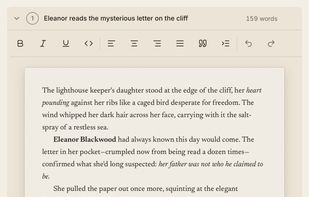
    Draft beneath the scene's beats: each beat is a prompt, with the prose written right under it.
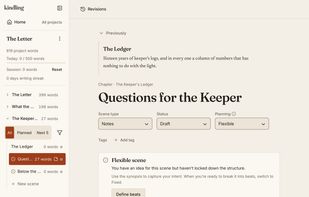
    Rolling Outline: each scene is Fixed, Flexible or Undefined, and the chapter tree shows its planning state.
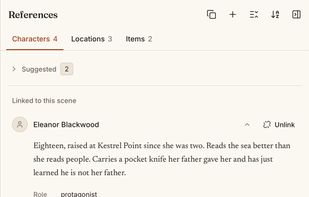
    References panel: the characters, locations and items linked to a scene, beside the draft.
    +3
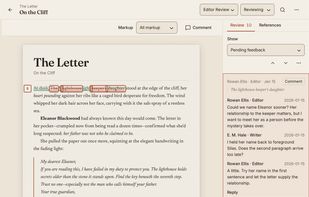
    Editorial review (new in 1.3): work through an editor's comments and suggestions in the manuscript.
    66 alternatives
  2. Tabularia icon
     1 like

    Book-writing software that keeps your whole manuscript in one navigable, typeset document, with an outline, timelines, and drafts you can merge.

    Cost / License

    • Paid
    • Proprietary

    Application type

    Since

    • New

    Platforms

    • Online
    • Software as a Service (SaaS)
    • US flagUnited States
    The whole book in one workspace: Outline, typeset page, Drafts, and timelines
    Anchors mark a moment or a passage and place it on a timeline
    Timelines follow character arcs and plot threads across the manuscript
    +18
    The Outline holds Books, Acts, Chapters, and Scenes, with color labels
    51 alternatives
  3. Chaptery icon
     2 likes

    A writing app for novelists on Mac and Windows: manuscript editor, World Builder, Storyboard and cloud sync in one app. Free for 30 days with one book.

    Cost / License

    • Paid
    • Proprietary

    Application type

    Since

    • New

    Platforms

    • Windows
    • Mac
    • US flagUnited States
    Write in a paginated editor that shows your book the way it will print, with chapters in the Outline and your notes alongside.
    Keep your characters, locations and events open next to the chapter you're writing, so the details are there when you need them.
    See how your cast, places and events connect on a visual map: allies, rivals, family, who rules where and what caused what.
    +2
    Plan your plot on a canvas of sticky notes and frames, each one linked to the characters and places it involves.
    6 alternatives