Apps tagged with 'process-list'

All apps in Apps tagged with 'process-list' category. Use the filters below to narrow down your search. 
Copy a direct link to this comment to your clipboard
  1. Process Explorer icon
     786 likes

    Process Explorer shows you information about which handles and DLLs processes have opened or loaded. The display consists of two sub-windows. The top always shows a list of the currently active processes, including the names of their owning accounts, whereas the information...

    Cost / License

    • Free
    • Proprietary

    Platforms

    • Windows
    • PortableApps.com
    Process Explorer screenshot 1
    Process Explorer screenshot 1
    85 alternatives
  2. htop icon
     280 likes

    htop is an interactive process viewer for Linux. It is a text-mode application (for console or X terminals) and requires ncurses. htop is an interactive top replacement that runs in the terminal. The available columns are: PID, STATE, PPID, PGRP, SESSION, TTY_NR, TPGID, MINFLT...

    Cost / License

    Platforms

    • Linux
    • BSD
    htop screenshot 1
    htop Screenshot
    Customizable
    +1
    htop screenshot 3
    76 alternatives
  3. Task Manager icon
     67 likes

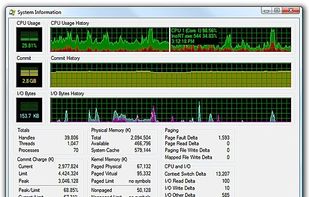
    Windows Task Manager is a task manager application included with Microsoft Windows NT family of operating systems that provides detailed information about computer performance and running applications, processes and CPU usage, commit charge and memory information, network...

    Cost / License

    • Free
    • Proprietary

    Platforms

    • Windows
    Task Manager screenshot 1
    78 alternatives
  4. Atmonitor icon
     21 likes

    Mac OS X System Monitor and Process Explorer Tool atMonitor is the most advanced monitoring tool for Mac OS X that displays system activity in real-time. It is designed to allow quick assessment of computers state and it is powerful enough to make it a core utility in anyones sys.

    Cost / License

    • Free
    • Proprietary

    Alerts

    • Discontinued

    Platforms

    • Mac
    Atmonitor screenshot 1
    71 alternatives
  5. Activity Monitor displays information about all the processes running on your Mac, including CPU, disk, memory, and network usage. You can see exactly how your computer’s resources are being used via a searchable table, helpful graphs, or even directly in the Dock icon.

    Cost / License

    • Free
    • Proprietary

    Platforms

    • Mac
    Activity Monitor screenshot 1
    Activity Monitor screenshot 1
    Activity Monitor screenshot 2
    +2
    Activity Monitor screenshot 3
    23 alternatives
  6. App Tamer icon
     8 likes

    ? Background app taming: CPU use by background apps can lead to slower performance, shorter battery life, prompt heating and trigger your Mac’s fans. App Tamer helps you to manage and reduce overall CPU usage by controlling idle apps working in the background.

    Cost / License

    • Paid
    • Proprietary

    Platforms

    • Mac
    App Tamer reduces fan noise, extend battery life and harness all of your Mac's power.
    See which apps are consuming battery and CPU even when you're not using them.
    App Tamer automatically reduces the CPU usage of apps when they're not in use.
    +5
    Built-in warnings tell you when apps use more CPU than they should.
    5 alternatives
  7. KillSwitch icon
     8 likes

    KillSwitch is an advanced system monitoring tool that is apart of Comodo Cleaning Essentials (CCE) it allows users to identify, monitor and stop potentially unsafe processes that are running on endpoint systems. Uniquely for a product of its type, KillSwitch leverages Comodo&#39.

    Cost / License

    • Free
    • Proprietary

    Application type

    Platforms

    • Windows
    KillSwitch screenshot 1
    KillSwitch screenshot 1
    KillSwitch screenshot 2
    54 alternatives
  8.  3 likes

    px tells you what processes are running on your system and how they are interconnected.

    Cost / License

    • Free
    • Open Source

    Platforms

    • Mac
    • Linux
    • BSD
    px screenshot 1
    px screenshot 1
    27 alternatives

  9.  1 like

    Glsof is two separate utilities (Queries & FileMonitor) to the command line utility Lsof by Vic Abell. Both applications are written in Java. Another fundamental requirement is the command line Lsof that has to be installed on your system.

    Cost / License

    • Free
    • Open Source

    Application type

    Platforms

    • Linux
    Glsof screenshot 1
    Glsof screenshot 1
    6 alternatives
  10. Daphne icon
     7 likes

    Daphne is a small (system tray) application for killing, controlling and debugging Windows' processes. It was born to kill a Windows process and became almost a task manager replacement. You can kill a process by dragging the mouse over the windows, by right-clicking the...

    Cost / License

    • Free
    • Open Source

    Application type

    Alerts

    • Discontinued

    Platforms

    • Windows
    • PortableApps.com
    Daphne screenshot 1
    25 alternatives
  11. Security Task Manager shows comprehensible information about programs and processes running on the computer. For each Windows process, it improves on Windows Task Manager, providing:

    Cost / License

    • Paid
    • Proprietary

    Platforms

    • Windows
    Security Task Manager screenshot 1
    Security Task Manager screenshot 1
    56 alternatives
  12. PrcView icon
     5 likes

    PrcView is a process viewer utility that displays detailed information about processes running under Windows. For each process it displays memory, threads and module usage. For each DLL it shows full path and version information.

    Cost / License

    • Free
    • Proprietary

    Alerts

    • Discontinued

    Platforms

    • Windows
    Main Screen
    49 alternatives