Apps tagged with 'Prevent Sleep'

All apps in Apps tagged with 'Prevent Sleep' category. Use the filters below to narrow down your search. 
Copy a direct link to this comment to your clipboard
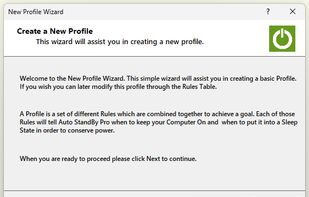
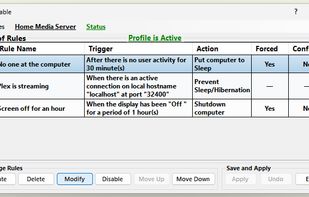
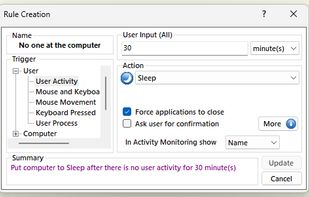
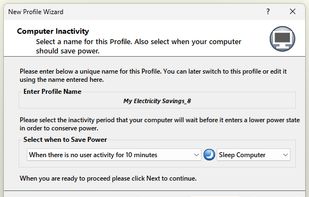
  1. AutoStandByPro puts your Windows PC to sleep, hibernates or locks it automatically when it is idle, and keeps it awake while something important, such as a download or a media stream, is running.
    Cost / License

    • Freemium (Pay once)
    • Proprietary

    Application type

    Since

    • Since 2015

    Platforms

    • Windows
    Auto StandBy Pro screenshot 1
    Auto StandBy Pro screenshot 2
    Auto StandBy Pro screenshot 3
    +2
    Auto StandBy Pro screenshot 4
    24 alternatives
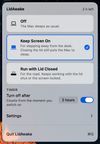
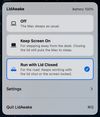
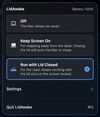
  2. LidAwake keeps your Mac working with the lid closed, without an external display. The free, open-source version (MIT) has Keep Screen On and Run with Lid Closed, Sleep when idle that lets the Mac sleep once your build, render or AI agent is done, Wake at for scheduled tasks, and...
    Cost / License

    • Freemium
    • Open Source (MIT)

    Application type

    Since

    • New

    GitHub

    • GitHub stars: 33

    Platforms

    • Mac
    Run with Lid Closed is on: the Mac keeps running after the lid is closed.
    LidAwake App screenshot 2
    +1
    Keep Screen On with a two-hour timer.
    4 alternatives
  3. Wardoff icon
     Like

    Wardoff is a free and open-source Windows utility designed to help protect a PC from unwanted shutdowns, reboots, sleep, and hibernation.

    Cost / License

    • Free
    • Open Source (MIT)

    Since

    • New

    Platforms

    • Windows
    • FR flagFrance
    • European Union flagEU
    Wardoff system tray menu in Block mode, with quick access to Block/Allow, autostart, shutdown, reboot, sleep, and hibernate controls.
    Wardoff tray icon showing the current Block mode status.
    8 alternatives
  4. Extra Cup icon
     Like

    Extra Cup is a small macOS menu bar app that stops your Mac falling asleep on its own.

    Cost / License

    • Free
    • Proprietary

    Application type

    Since

    • New

    Platforms

    • Mac
    • AE flagUnited Arab Emirates
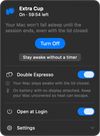
    The Extra Cup panel in dark mode: an hour's session counting down, with Double Espresso on to keep the Mac awake with the lid closed.
    The same panel in light mode. On battery with no display attached, it reminds you to keep the Mac uncovered so heat can escape.
    6 alternatives
  5. A keep-awake tool that turns itself off. Holds Windows awake while your render, build, upload or AI agent is actually busy, and lets the PC sleep when it goes idle.

    Cost / License

    • Free
    • Open Source (MIT)

    Since

    • Since 2026 (updated Aug 2026)

    Platforms

    • Windows
    • EG flagEgypt
    Keeps Windows awake only while the app you pick is actually working, then releases the lock by itself.
  6. Lidnight icon
     Like

    Keeps your MacBook awake with the lid closed while AI coding agents like Claude Code and Codex work, then lets it sleep when they're done.

    Cost / License

    • Freemium (Pay once)
    • Proprietary

    Since

    • New

    Platforms

    • Mac
    • KR flagSouth Korea
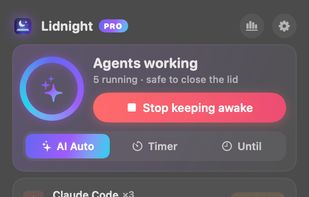
    Lidnight keeps your Mac awake with the lid closed while AI agents work
    Menu bar popover showing active AI agents and Claude/Codex usage limits
    4 alternatives