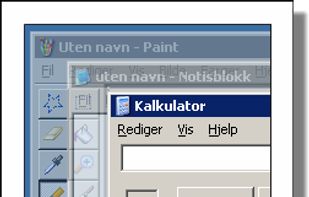
Make all windows but the active one transparent.
Features:
- User defined transparency level.
- Can ignore always ontop windows.
- Won't make parent windows transparent while children is active.

ZoneSize is described as 'Define zones that autosize windows dropped on them' and is a Window Manager in the os & utilities category. There are more than 25 alternatives to ZoneSize for a variety of platforms, including Windows, Linux, PortableApps.com, File Explorer and X11 apps. The best ZoneSize alternative is SmartSystemMenu, which is both free and Open Source. Other great apps like ZoneSize are Sizer, RBTray, altdrag and allSnap.
Make all windows but the active one transparent.
Features:

Plumb is designed to reduce the time spent manually moving windows on your desktop. With higher resolution and larger monitors becoming the norm it’s common to have several applications open at any given time — none of which really need 100% of the screen.


Dims all windows except the active one.
Features:

The Wonderful Icon is a small Windows utility that resides in your PC's taskbar tray. With it, you can:

Taekwindow is a simple, lightweight and free Windows program that allows you to move and resize windows by dragging them with the Alt key, similar to many X11 window managers.

A lightweight utility for allowing you to quickly snap windows to a tiling grid under your existing Linux window manager. Can be triggered via keyboard shortcuts, the command line, or D-Bus calls.
WinSize2 can move windows automatically to a predefined place and / or resize the width and/or height to a predefined size.


Sometimes a lot of deskop clutter can hide a window (eg, open file, programs, files-explorer, dialogs)

Chameleon Window Manager will allow you to control the windows of your programs using customizable buttons added to the title bars of the windows (Always on Top, Minimize to Tray, Minimize to Caption, Specify Transparency, Position window at left/right of screen).



Ever try to size a window so it just touches the edge of the screen? It’s tedious (at least for me). FreeSnap allows you to instantly resize any window edge to the corresponding screen edge. Want that window to touch the right edge of the screen?

TrayIt! - minimize to the system icon tray any program (Outlook Express, Notepad, Word, Internet Explorer, Sunbird, Thunderbird, Opera, OpenOffice etc.) and get more room in the Taskbar!


WinLayout is a program with keyboard hotkeys to move, resize, and snap windows all around the desktop area.