

Ziggity icon
Ziggity icon

Ziggity

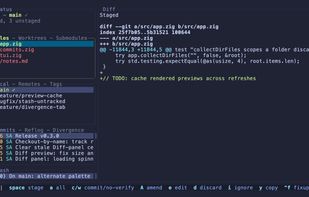
Ultra-fast Git terminal UI built in Zig offering line and hunk staging, interactive rebases, diff previews, DAG history, multi-selection, customizable themes, background fetch, and non-blocking operations for a streamlined, keyboard-first Git workflow.
Ziggity screenshot 1

Cost / License

  • Free
  • Open Source (MIT)

Application type

Platforms

  • Mac
  • Windows
  • Linux
  • Git
  • Homebrew
0likes
0comments
0articles

Features

Properties

  1.  Lightweight
  2.  Privacy focused

Features

  1.  No Tracking
  2.  Ad-free
  3.  Command line interface
  4. Git icon  Git Support
  5. Git icon  Git integration
  6.  Keyboard Navigation
  7.  Support for Keyboard Shortcuts
  8.  Tui
  9.  Terminal-based

Ziggity News & Activities

Highlights All activities

Recent activities

Ziggity information

  • Developed by

    GB flagSimone Arpe
  • Licensing

    Open Source (MIT) and Free product.
  • Alternatives

    12 alternatives listed
  • Supported Languages

    • English

AlternativeTo Categories

DevelopmentOS & UtilitiesOffice & Productivity

GitHub repository

  •  117 Stars
  •  5 Forks
  •  0 Open Issues
  •   Updated  
View on GitHub

Popular alternatives

View all
Ziggity was added to AlternativeTo by Paul on and this page was last updated .
No comments or reviews, maybe you want to be first?

What is Ziggity?

Ziggity puts your whole Git workflow in one terminal window: stage single lines, commit, branch, rebase interactively, and read history without ever reaching for the mouse. Every list has a live diff preview, every action is a keystroke, and nothing ever blocks the interface.

It follows the workflow that lazygit made popular, and it owes that project a lot. It is not a port, though. Ziggity is written from scratch in Zig, drives plain git subprocesses (no libgit2), and in the places where the two tools differ, the difference is deliberate. The section below explains exactly where and why.

Highlights:

  • The whole workflow: status, files, branches, commits, and stash panels with diff previews and a footer that follows context.
  • Staging down to the line: enter a file to stage single lines or hunks, with an optional split view showing unstaged and staged side by side.
  • Full interactive rebase: drop, squash, fixup, edit, reword and move per commit, a plan editor (i), cherry picking, custom patch building, autosquash, and rebase --onto from a marked base.
  • History and inspection: the real git log --graph DAG (ctrl+l) with first parent jumps, ref against ref diffing (W) with reverse and merge base modes, GPG signature verification (x), and log filtering (/).
  • Multi selection: v or shift+arrows select a range in any list to act on many files, commits, branches, or stashes at once; * selects a branch's own commits.
  • Stays in sync: a quiet background git fetch keeps the incoming commit count current on its own; slow and network operations run off the interface thread while navigation stays live.
  • Thoughtful touches: prepare-commit-msg prefill, stash naming, a keep everything snapshot, per stash patch export, and bracketed paste so a pasted multiline message never submits early.
  • Lightweight and explicit: one small binary, plain git subprocesses, no libgit2, fully remappable keys, themeable colors, custom commands.

Official Links