Zenith Filer is a file manager for Windows that tries to stay out of your way.
Speed first. It starts in about a second, and copying, searching and loading folders all run in the background. It was tuned on real measurements on corporate PCs where antivirus software makes every disk access slow.
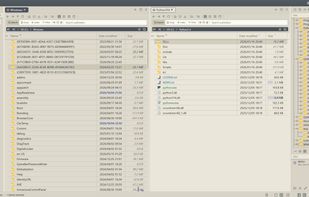
Two panes, tabs, and everything a click away. Each pane has its own tabs, and a working set saves the whole tab layout for later. Press both mouse buttons together and a ring of your eight most-used actions opens around the cursor. Ctrl+Shift+P finds any action by name. Every shortcut can be remapped.
File work done properly. Copies and moves show speed and time remaining and can be paused. Name conflicts can be decided one by one, and file operations can be undone. Folder compare, hash verification, batch rename, archives, FTP/SFTP/FTPS and phones (MTP) are built in.
A real terminal inside. Up to four ConPTY terminals sit next to your files; cd in a terminal moves the pane with it.
Optional extras. No-code macros (with JavaScript underneath), indexed full-text search, and AI features that work with Claude, OpenAI, Gemini or fully offline with Ollama. Everything works with AI turned off.
Make it yours. 57 built-in themes, a community theme store, and achievements that unlock as you use it.
It is portable: no installer, settings stay next to the app, and updates are small delta downloads. The free version has no time limit; some batch, export, macro and AI features have a daily limit that Pro ($15, one-time) removes.







 user-4666 added Zenith Filer as alternative to Total Commander, Altap Salamander, Double Commander, Files and 9 more
 sulkyjp

No comments or reviews, maybe you want to be first?