





YuDisk
A native Windows application for quickly analyzing disk usage and finding the files and folders that consume the most space.

Cost / License
- Free
- Proprietary
Platforms
- Windows


Features
Properties
- Lightweight
- Privacy focused
Features
- Works Offline
- Portable
- Ad-free
- No registration required
- No Tracking
- Dark Mode
YuDisk News & Activities
Recent activities

YuDisk information
Licensing
Proprietary and Free product.Alternatives
29 alternatives listedBadge
Get an embeddable badge for YuDiskSupported Languages
- English
- Japanese
- Belarusian
- German
- Spanish
- French
- Hungarian
- Italian
- Korean
- Polish
- Portuguese
- Russian
- Ukrainian
- Chinese


What is YuDisk?
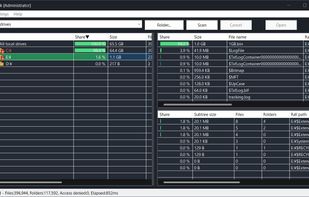
YuDisk is a disk usage viewer for Windows that helps you inspect how local drive space is being used.
It links an Explorer-style tree with top files and top folders ranked by size, so you can quickly reach the locations using the most disk space. On NTFS drives, YuDisk can use a faster scan mode when launched with administrator privileges.
Disk Usage View Check files and folders that consume disk space with an Explorer-style tree and size-based rankings.
Fast NTFS Scan On NTFS drives, YuDisk can use NTFS metadata for faster scanning when running with administrator privileges.
Standard Scan YuDisk also works without administrator privileges and on non-NTFS drives by using a normal directory walk.
Top Lists Show the largest files and folders across the whole scan or under the selected folder.
Explorer Integration Open the target location in Explorer to inspect files and folders directly.
Themes and Languages Supports multiple visual themes, including dark mode, and multiple display languages such as English and Japanese.
DPI Support Designed for high-resolution displays and multi-monitor environments.
Native Application A Win32 API based native application. .NET Framework is not required.