
Yoslion Download icon

Yoslion Download

Downloads files over multiple connections and resumes interrupted transfers from the data already written to disk, on macOS, Windows and Linux.
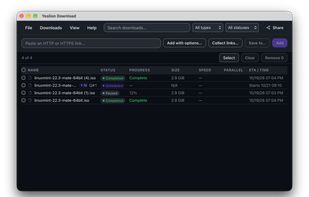
The download list, with completed, paused and scheduled transfers side by side.

Cost / License

  • Pay once
  • Proprietary

Platforms

  • Windows
  • Mac  Apple Silicon only (M1 or later); there is no Intel build. Requires macOS 11 or later. The bundled Safari extension requires macOS 13 or later, so on macOS 11 and 12 the application runs but Safari integration is not available.
  • Linux  Distributed as a .deb package for 64-bit x86 (Debian, Ubuntu and derivatives). No RPM, AppImage, Flatpak or Snap package is provided.
0likes
0articles
Save

Features

Properties

Features

Highlights All activities

Yoslion Download News & Activities

Recent activities

Yoslion Download information

AlternativeTo Category

File Sharing
Yoslion Download was added to AlternativeTo by Yosbel-Palacios on and this page was last updated .

No comments or reviews, maybe you want to be first?

What is Yoslion Download?

Yoslion Download is a desktop download manager for macOS, Windows and Linux.

It splits a transfer across several connections and adjusts how many it uses while the transfer is running, rather than holding a fixed number. If a download is interrupted, it resumes from the bytes already saved instead of starting again.

Partial data is kept separate from the final file, and the completed file is placed in one atomic step, so a file reported as complete has been fully written. A SHA-256 checksum can be entered for a download and verified against the finished file.

Downloads can be queued with priorities, scheduled to start no earlier than a chosen time, paused and resumed individually or all at once, and several can run at the same time.

Browser integration is provided through extensions for Chrome, Chromium, Firefox, Edge, Brave and Opera; the macOS package includes a Safari extension. A download started in the browser is handed over to the desktop application.

A single licence covers all three operating systems and allows up to three active installations, which can be released and reassigned when hardware changes. Once activated, the application keeps working offline.

Installers are code-signed and published with SHA-256 checksums, and the Linux package carries a detached OpenPGP signature. The application collects no telemetry and includes no analytics.
