


WorkTime
93 likes
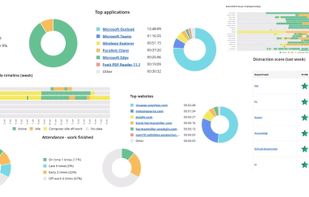
Monitors computer, internet, and activity data for both remote and in-office employees, providing scalable, privacy-focused, non-invasive analysis, productivity insights, attendance reports, and detailed, automated reporting for organizations managing thousands of devices.

Cost / License
- Pay once
- Proprietary
Application typeApplication types
Platforms
- Mac
- Windows

Features
Highlights All activities
WorkTime News & Activities
Recent News
No news, maybe you know any news worth sharing?
Share a News Tip
Recent activities
The experience has been excellent. They explained everything clearly, helped me with the setup, and answered all of my question, which made getting started much easier.
- DavidCarter liked WorkTime
 getapps added WorkTime as alternative to CoffeeTime
Awesome, rock-solid, and budget-friendly software.
- HarryEubanks liked WorkTime
my only criticism is I can't set up time off for half a day. It's only possible to book for the full day. Sometimes employees just need the half day off. Otherwise, the system is reliable and works well
 Drytrix added WorkTime as alternative to TimeTracker (Drytrix)



Developed by
 Nestersoft Inc.
 Licensing
Proprietary and Commercial product.Pricing
One time purchase (perpetual license) that costs up to $11.Rating
Average rating of 4.7Alternatives
107 alternatives listedBadge
Get an embeddable badge for WorkTimeSupported Languages


Comments and Reviews
The experience has been excellent. They explained everything clearly, helped me with the setup, and answered all of my question, which made getting started much easier.
Awesome, rock-solid, and budget-friendly software.
my only criticism is I can't set up time off for half a day. It's only possible to book for the full day. Sometimes employees just need the half day off. Otherwise, the system is reliable and works well
An excellent set of features that checked all boxes. It's spot on, track to the second without rounding up, and the numbers are dead on
I've presented the reports and shared them with our management, and there's no more confusion about the number of hours and days worked. They recently started releasing integrations. I hope to see more of them with each new update. I'm looking forward to the Asana integration so that time can be automatically linked to tickets or project tasks.
It's not just about productivity. Having clear insights helped us build more trust within the team now that everything is transparent. No more 'who's doing what' arguments.
I like WorkTime because it's an honest tool. It doesn't take screenshots of employees' computers.