





Wizmac Explorer
Like
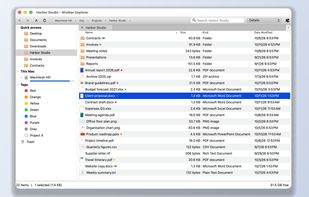
A macOS file manager for users who prefer Windows Explorer conventions, with a folder tree for local, network, cloud, and Trash locations. It supports Delete, F2, F5, Alt+Left, cut/copy/paste, tabs, previews, Spotlight search, archives, and undo or redo for file actions.

Cost / License
- Free Personal
- Proprietary
Platforms
- Mac


Features
Highlights All activities
Wizmac Explorer News & Activities
Recent activities
- Thierry Loo added Wizmac Explorer
 Fla added Wizmac Explorer as alternative to Double Commander, Files, Spacedrive, Total Commander and 31 more
- Fla updated Wizmac Explorer
- Thierry Loo updated Wizmac Explorer
 Thierry Loo added Wizmac Explorer as alternative to Trove File Explorer

Developed by
 Wizit.org
 Licensing
Proprietary and Free Personal product.Pricing
One time purchase (perpetual license) ranging between $2 and $6.Alternatives
35 alternatives listedBadge
Get an embeddable badge for Wizmac ExplorerSupported Languages


No comments or reviews, maybe you want to be first?