Windsify icon
Windsify icon

Windsify

Use Windows keyboard shortcuts and window snapping on Mac: Ctrl+C, Alt+Tab and Win+Arrow, without swapping modifier keys.
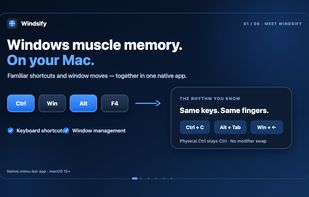
Windows muscle memory on Mac: familiar keyboard shortcuts and window management together in Windsify. Official illustrated product introduction.

Cost / License

  • Freemium (Pay once)
  • Proprietary

Application type

Platforms

  • Mac  Requires macOS 15 or later. Available in English and Simplified Chinese.
0likes
0articles
Save

Features

Properties

Features

Highlights All activities

Windsify News & Activities

Recent activities

Windsify information

  • Developed by

    AU flagWondering Works
  • Licensing

    Proprietary and Freemium product.
  • Pricing

    One time purchase (perpetual license) ranging between $15 and $20 + free version with limited functionality.
  • Alternatives

    3 alternatives listed
  • Badge

    Get an embeddable badge for Windsify
  • Supported Languages

    • English
    • Chinese
Windsify was added to AlternativeTo by Momo Wonders on and this page was last updated .

No comments or reviews, maybe you want to be first?

What is Windsify?

Windsify is a macOS app that brings Windows keyboard shortcuts and window snapping to Mac. It's designed for those using a Windows keyboard with a Mac or switching between both systems. The app allows users to use familiar actions like Ctrl+C for copy, Alt+Tab for switching apps, and Win+Arrow for arranging windows without changing the Ctrl and Command system.

The free version includes basic shortcuts like copy, cut, paste, undo, redo, and Alt+Tab app switching, among others. It maintains native Ctrl+Space, secure input, and recognized remote-desktop shortcuts.

The Pro version adds window snapping features, moving windows between displays, and Windows-style Finder operations. It can also automatically configure supported local VS Code profiles.

Windsify does not record typed text or send app telemetry, and no account is required. It is compatible with overlapping keyboard remappers and window managers.

The app comes with a 14-day full Pro trial. After the trial, Free keyboard features remain available. Pro is a one-time purchase for up to three Macs, including future updates, with no subscription. The regular price is $19.99, but the current early-bird price is $14.99.

The app can be downloaded from the official website, which also provides a complete shortcut reference, setup guides, and a Free/Pro feature comparison. It requires macOS 15 or later.
